ViciBox 12 after install: firewalld, reboots and root password
What to expect on a ViciBox 12 server built from a cloned image: a firewalld that hangs on dbus, a root password that does not take, and slow reboots.

To the point
On a ViciBox 12 snapshot turned into new servers, firewalld was not running and hung on dbus, the root password the cloud API returned did not work, and a reboot took over 180 seconds. Use nftables, know the image's own password, and apply changes live.
- The order matters: re-point the IP, hostname, certificate, firewall, then SSH port last.
- Issue the certificate before the firewall closes ports 80 and 443.
- A failed certificate issue leaves Apache unable to start.
- Let's Encrypt allows five certificates per exact name per 168 hours.
This is about a snapshot of ViciBox 12 cloned into new servers, not an install from the ISO. Check each point against your own build.
Firewall: firewalld is dead and will not start
On earlier ViciBox servers firewall-cmd worked. On the v12 snapshot the service was inactive and starting it hung waiting for dbus. We did not find out why, and did not need to.
We used nftables directly: a drop policy on input, accept rules for whitelisted source addresses, and an enabled systemd unit that loads the rules at boot. We proved persistence separately, because a firewall that vanishes on reboot is worse than none.
A default-drop firewall locks out agents on dynamic home addresses. ViciBox's answer is a small web login that whitelists the visitor's address, and it works with nftables:
- A renamed
valid8.phpis served on a random open port. - A successful login writes the address to
vicidial_user_log(computer_ip, eventLOGIN/VICIBOX). - A cron job copies those addresses into a named set,
dynwhite, that the drop policy accepts.
Login redirects by user level: level 8 and above to /vicidial/admin.php, everyone else to /agc/vicidial.php. We set the redirect delay and the sync to 30 seconds, so the address is allowed first. Entries age out after 14 days.
The root password is not the one you were given
After a rebuild from an image, the provider's API returns a root_password. On a ViciBox snapshot it does not work, because the image has no cloud-init password agent to apply it. The password baked into the snapshot persists.
Store it in a secret store until you have installed a key and turned password login off. If the API password fails first time, try the image's own. See securing a VICIdial server for the key-only setup.
Reboots are slow
A reboot of the v12 clone took more than 180 seconds, because one unit took its full shutdown timeout. The only failed unit after boot was numad, which is harmless and leaves the state reported as degraded.
So we stopped rebooting: nft -f loads the rules and a reload applies SSH changes. The reboot was tested once, to prove persistence. If a v12 box seems dead after a reboot, wait. We did not test shortening the timeout.
The order that works
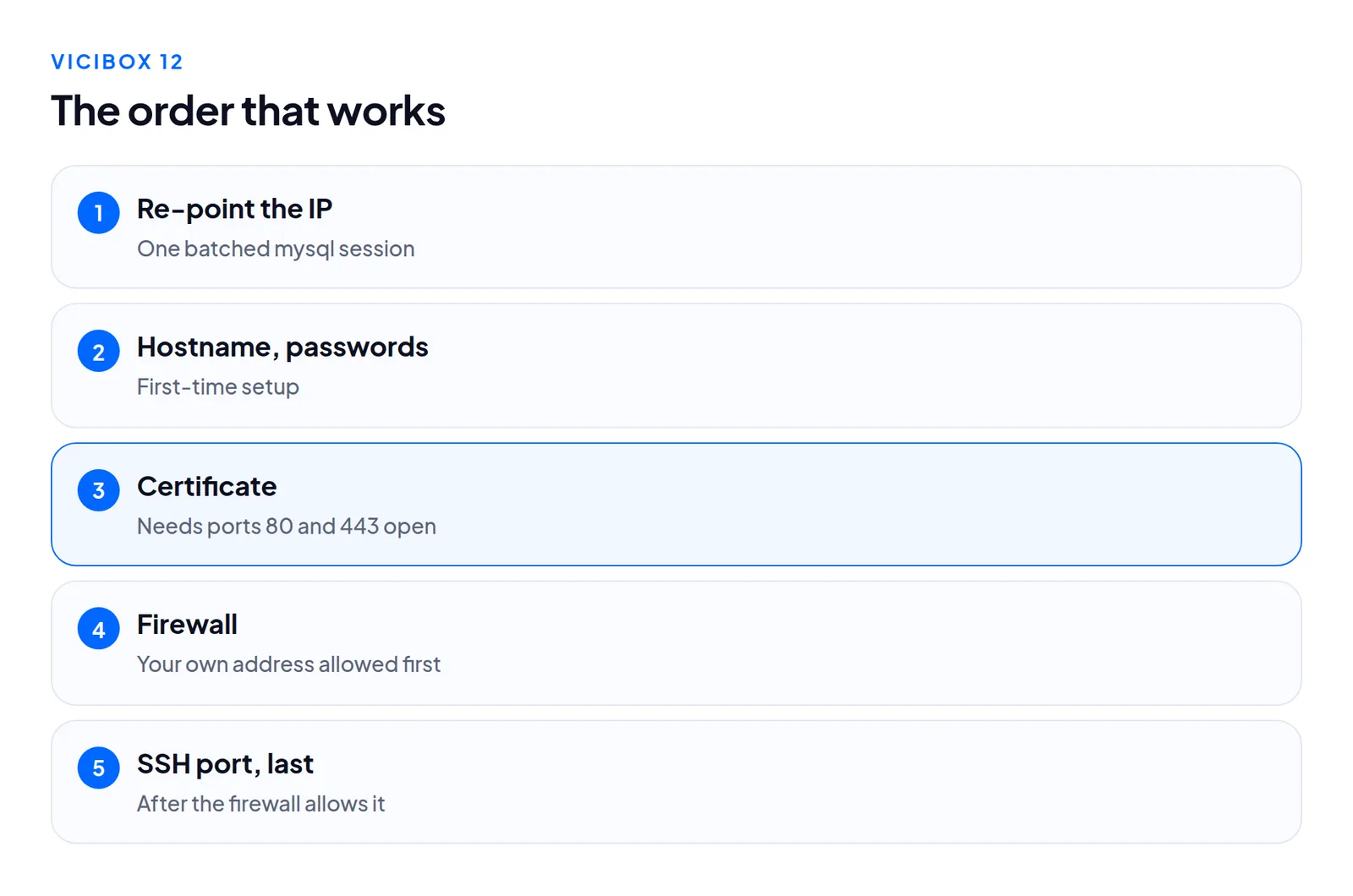
- Re-point the IP. A clone carries the original address in many places. One batched
mysqlsession took about half a second. A loop with one process per column took about 45. - Set the hostname and first passwords.
- Issue the certificate. Let's Encrypt needs ports 80 and 443 open, so this comes before the firewall closes.
- Apply the firewall, with your own address already allowed.
- Move SSH to its final port last, after the firewall allows your address on it. To change the port safely: add the new one, allow it, connect once from a second session, then remove the old one.
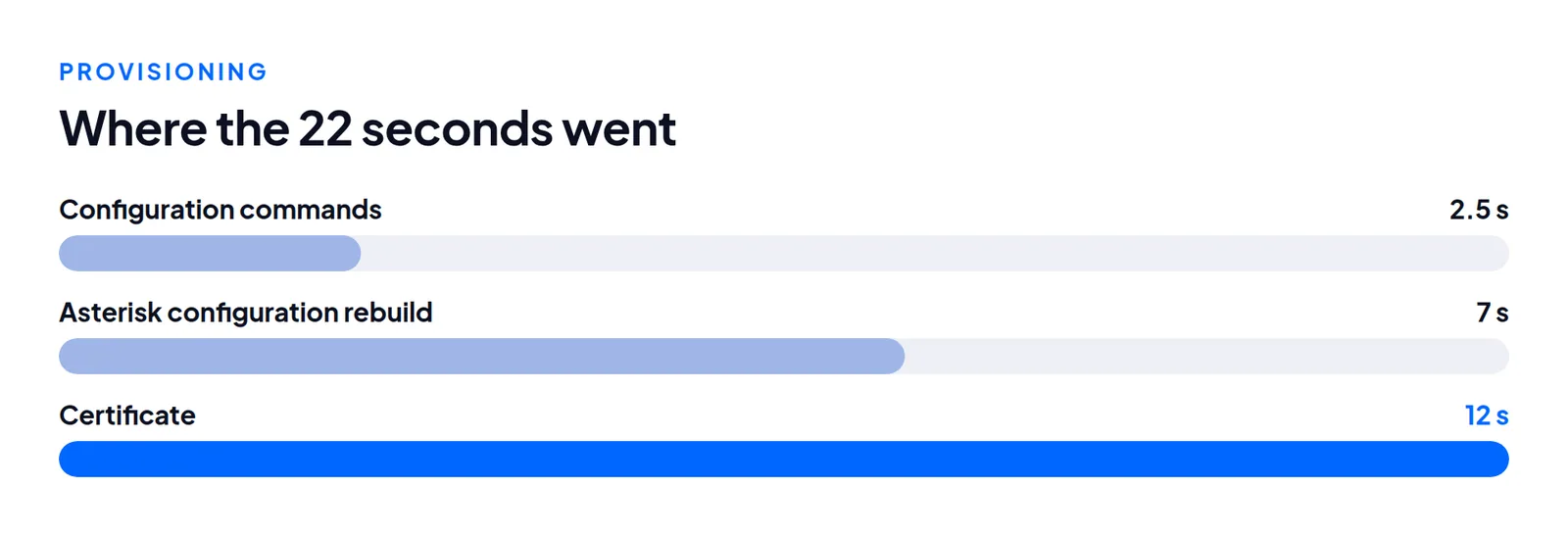
The wait for the rebuilt server to boot was most of the 100 seconds.
Certificates can take Apache down
vicibox-ssl points Apache at a certificate under /root/.acme.sh/<fqdn>/. If issuance fails, that file is never written and Apache refuses to start. The agent screen, admin pages and firewall login all go down together.
Rebuild the same hostname repeatedly and you will hit "too many certificates (5)". Use a fresh sub-domain per test run.
Two more things to check
The image's default 6666 admin was level 9 in the ADMIN group, yet delete_users, modify_servers, view_reports, export_reports, vdc_agent_api_access and callcard_admin were all 0. If your build only changed the password, check these flags.
The image also has a randomised database name, user, password and port. It is never asterisk. Read the VARDB_* lines in /etc/astguiclient.conf.
What we did not test
Calls. This covered boot, networking, certificates, logins and web pages, not carrier traffic. We did not restore a v11 backup onto a v12 clone. Schema direction decides that, as in what we copy and what we never copy.
Questions people ask
Why does the API root password fail?
The image has no cloud-init password agent, so the password baked into the snapshot stays.
Is a reboot required after changes?
No. The rules and SSH settings were applied live.
Next steps
If you want ViciBox 12 or Ubuntu delivered with these steps done, VICIdial hosting lists what is included, pricing the cost, and order starts one.
VICIdial is a trademark of its owner. Trustane is an independent hosting provider.
Sources
- Migration ground truth, a fresh ViciBox compared with an old one
- Security sweep, firewall and credential handling on provisioned boxes
- Let's Encrypt documentation, rate limits
- Cover photo by RDNE Stock project on Pexels
Managed VICIdial hosting