Press-1 in VICIdial: queue, outside number or server by IP
What VICIdial does when a Press-1 caller presses a key. The survey script, the call menu, an in-group under CLOSER, a carrier, or a SIP dial by IP.

To the point
VICIdial has no press-1 campaign type. It builds one from an outbound campaign, a call menu and, for agents, an in-group. When the person answers, VICIdial's survey script hands the call to the call menu with the lead's phone number as its caller ID, and the key pressed picks the menu option. Below is the path for each route, read from VICIdial's source (SVN trunk) and its manager manual 2.14-960a, then carried on real dialer calls on a ViciBox 12 test server on 22 October 2026.
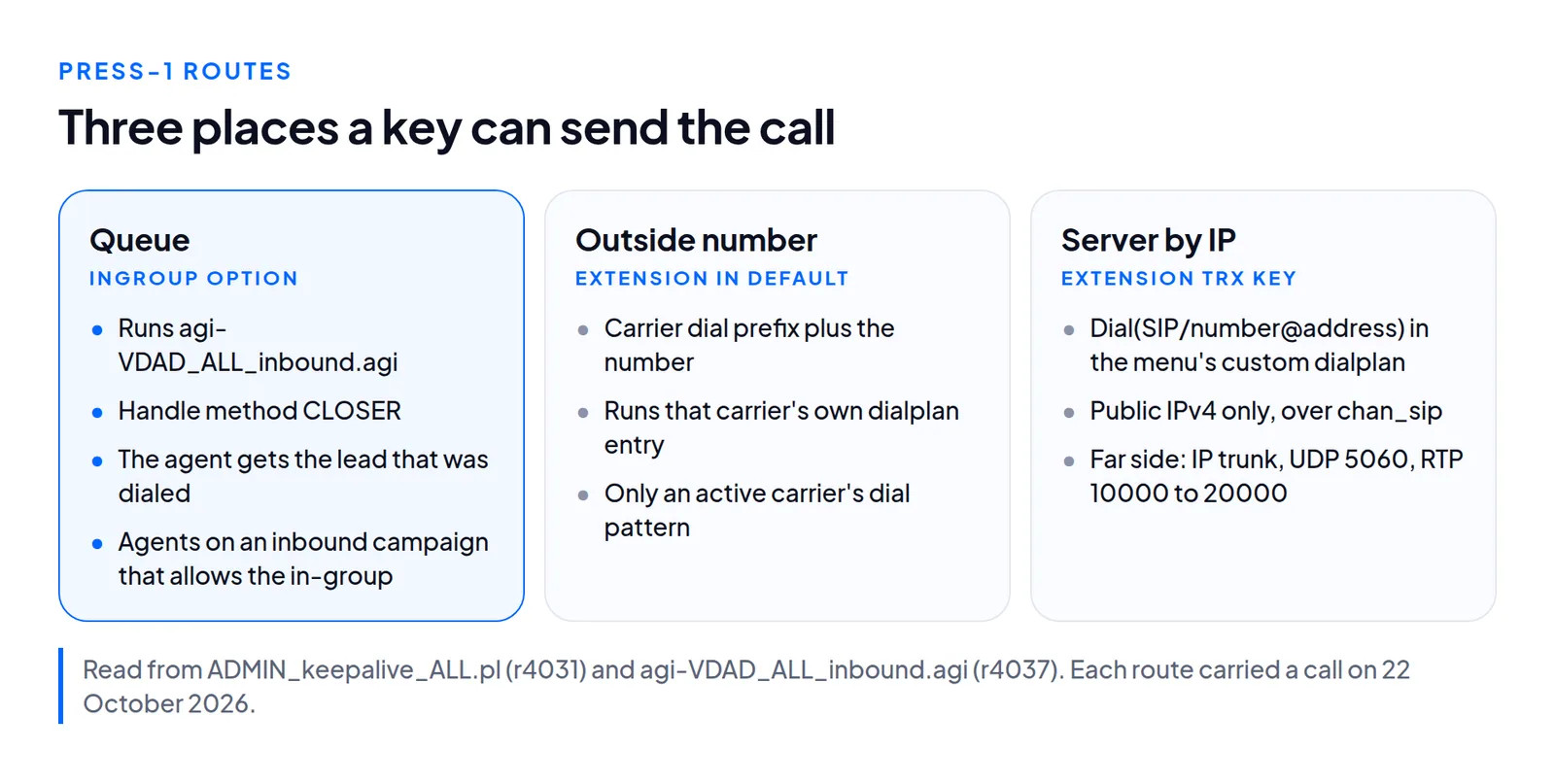
- Queue: an INGROUP option, with the handle method CLOSER so the in-group script does not drop a call on a Local channel.
- Outside number: an EXTENSION option into a carrier's own dialplan.
- Another server by IP: a SIP dial to that address. The far server must accept ours.
- No key and wrong key are the menu's TIMEOUT and INVALID options.
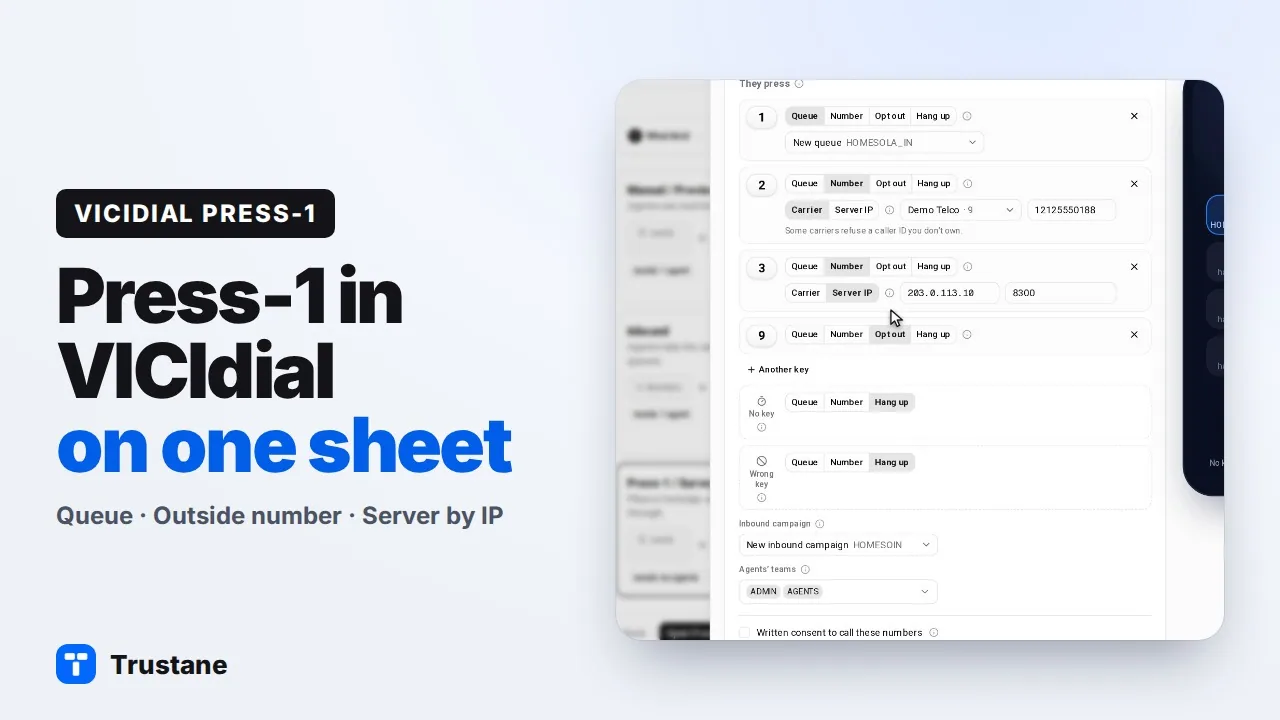
Plays from YouTube when you press Play. Google's privacy policy applies.
VICIdial's manual calls this a "press-1" type, or survey, campaign (page 43). It is not a type you pick: it is an outbound campaign whose Survey Method is CALLMENU and whose routing extension runs the survey script. This is how VICIdial runs the campaign that Trustane's Press-1 sheet builds.
From answer to the menu
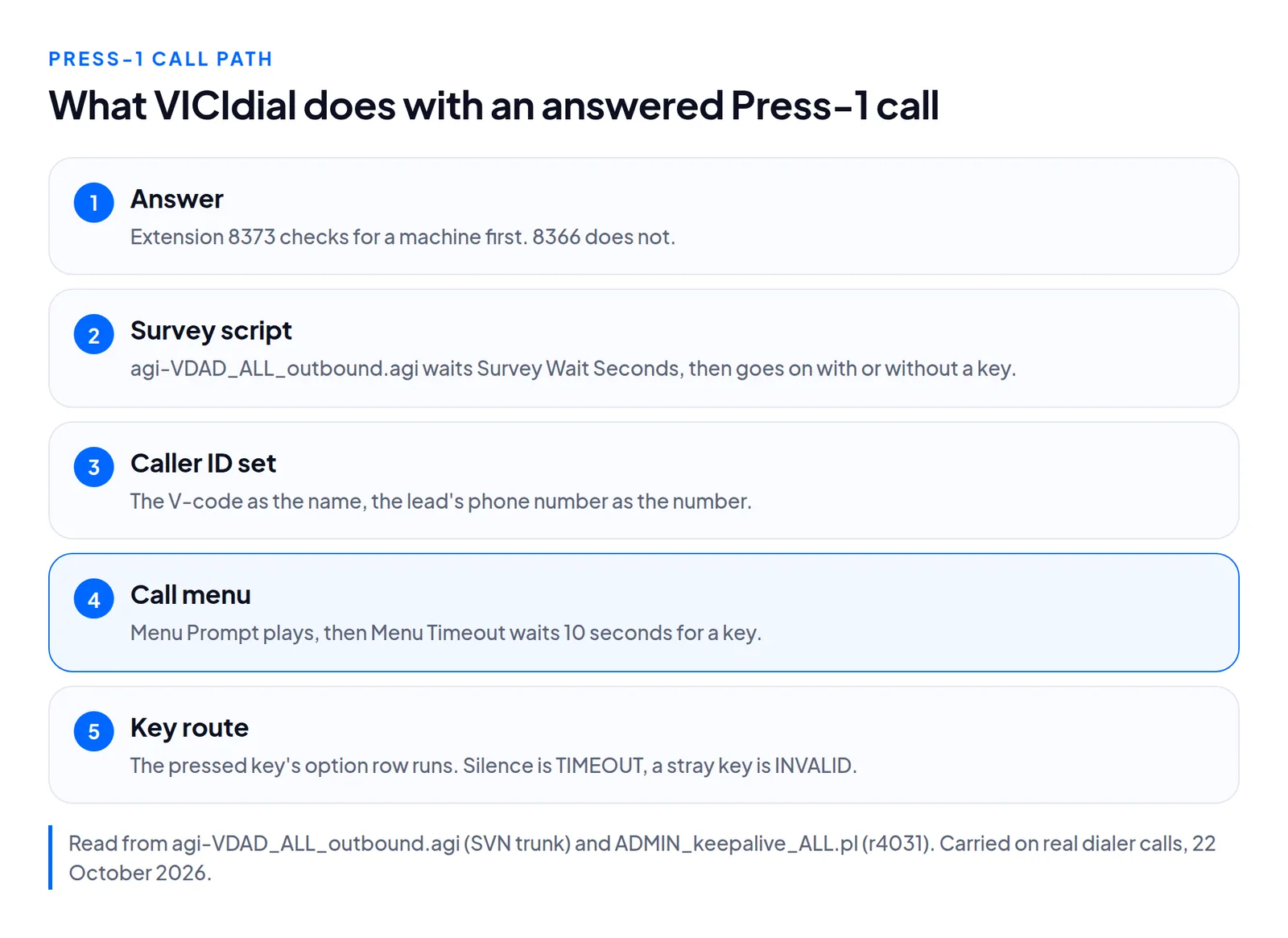
- The routing extension. VICIdial's help lists 8366 as "Used for press-1, broadcast and survey campaigns", and 8373 as the same after Answering Machine Detection. The manual's own press-1 tutorial uses 8366, the RATIO dial method and a dial level of 1 (page 43).
- The survey script. 8366 runs
agi-VDAD_ALL_outbound.agiin SURVEYCAMP mode. It reads the campaign's survey settings and waits Survey Wait Seconds for a key, 10 by default. Our sheet sets 1: one second of silence before the menu. - No key is fine. With Survey No-Response Action at OPTOUT, the script sends the call on to the Survey Method even when nothing was pressed.
- Into the menu. With Survey Method CALLMENU, the script sets the caller ID: the call's V-code as the name, the lead's phone number as the number. It logs status SVYCLM and moves the call to the menu's
sextension.
The V-code is a V and 19 digits that carry the lead ID. The campaign's Survey DTMF Digits and Not Interested Digit do nothing here, since there is no survey prompt. The keys live on the call menu.
The call menu
A call menu is a set of database rows. VICIdial builds call menus into the dialplan on its once-a-minute pass (ADMIN_keepalive_ALL.pl), when the server is flagged to rebuild. The Menu ID becomes the context name. In that context:
- The Menu Prompt plays, then the menu waits Menu Timeout seconds for a key, 10 by default.
- Each option row becomes an extension named by its key.
- The TIMEOUT row becomes extension
tand the INVALID row becomesi, so silence and a stray key are routed like any other key. - With Log Key Press on, VICIdial logs the key the caller pressed. Our sheet switches it on.
Route 1: a queue
The option is INGROUP. VICIdial writes it as a call to its inbound script, agi-VDAD_ALL_inbound.agi, passing the option's handle method, in-group, list and campaign.
Why CLOSER. The inbound script exits on a call that arrives on a Local channel, unless the inbound number contains CXFER or the handle method starts with CLOSER. It logs "VDAD START LOCAL CHANNEL: EXITING-" and the dialplan priority. A test call placed into the menu is a Local channel. On our test server, with the method set to CIDLOOKUP, that call was dropped. With CLOSER it reached the agent.
The lead comes along. A comment in the script allows for "outbound auto-dial calls or previous in-group calls passed through call menus". For a V-code, the script reads the lead ID from it, so the agent gets the lead that was dialed, not a new one. On the test server, lead 8 reached the agent as lead 8, logged as XFER.
Who answers. The call waits in the in-group for an agent logged in to an inbound campaign that allows it. Our sheet adds the in-group to that campaign's allowed in-groups. The agents' user groups must also allow the campaign. Which free agent gets the call is the in-group's Next Agent Call setting.
Route 2: an outside number through a carrier
The option is EXTENSION. Its value is the carrier's dial prefix plus the number, and its context is default. VICIdial writes it as a jump to that number in default, which includes every active carrier's dialplan entry, so the call runs the entry of the carrier whose pattern matches.
Nothing in the menu sets a caller ID. Our server gives the call the lead's phone as caller ID, set by the survey script before the menu; a carrier that signs in over PJSIP is sent the account username in its place. The sheet also notes: "Some carriers refuse a caller ID you don’t own."
Our sheet accepts only a prefix and number that match a dial pattern of an active carrier on the server. Setting up the carrier itself is in our PJSIP carrier guide.
Route 3: another server by IP
Here we write no carrier, and no password. The call menu's Custom Dialplan Entry gets three lines per IP key: log the call, Dial(SIP/<number>@<address>,300), hang up. The key's option is EXTENSION trx1 (for key 1) in the menu's own context, and VICIdial adds the custom entry to that context. The dial goes out over chan_sip, so the server must have it running. On the test server, the far side's log showed the customer's number as caller ID.
What we refuse. Only a public IPv4 address is dialed, and never the server's own. The wizard refuses an IP route to any address that is one of your server's carriers, checked in the form and again on the server. Our reasoning, not a measurement: such a dial would go around that carrier's dial patterns.
What the far side needs. Its admin adds our server's address as a SIP trunk with IP authentication and no registration, on UDP 5060. They point the number at the phone or extension that should ring, and let our address through their firewall on UDP 5060 and RTP ports 10000 to 20000. The setup steps ask the far server to accept ulaw or alaw and RFC 2833 keypad tones.
No key and wrong key
TIMEOUT runs after Menu Timeout seconds with no key, and INVALID on a key with no option row. Each is its own option row, so it takes a queue, a number or a hang-up like a digit does. An IP route there dials from trxT or trxI. On the test servers, no key hung up with status SVYCLM, no key sent to a queue reached it as XFER, and a wrong key, 5, went out through a carrier. Our sheet never lets either one opt a caller out.
Opt out with cm_dnc.agi
An opt-out key, such as 9, runs VICIdial's cm_dnc.agi as cm_dnc.agi,DNC---YES---<campaign>---B---CAMP, the same shape as the example in the script's own header. The third argument names the campaign whose DNC settings apply. The fourth is the menu option the call goes to afterwards, B by default. On a test server, a menu with no B option sent the opted-out caller on as INVALID, and with the wrong key set to a queue, that caller reached the queue. So a menu with an opt-out key now also gets B, which hangs up. After that change, a test call that pressed the opt-out key put the number in vicidial_dnc, the lead became DNC, and nothing entered the queue. The fifth argument, CAMP, looks for the lead in that campaign's lists only, so the lead's own status changes only when it is found there. More in VICIdial DNC lists.
Answering machines
Extension 8373 runs Asterisk's AMD, then VICIdial's VD_amd.agi, then the same survey script. The campaign's AMD send to Action decides what a machine gets: at Y the call goes to the Answering Machine Message or the CPD AMD Action, and at N, the default, it hangs up as soon as a machine is detected. For the message, VICIdial waits for the greeting to finish, then leaves your message. Our sheet's three choices:
| On a machine | Extension | AMD send to Action |
|---|---|---|
| Leave a message | 8373 | Y, with your message file |
| Hang up | 8373 | N |
| Don’t check | 8366 | No detection |
On the test server, a machine call was logged by VD_amd.agi as MACHINE LONGGREETING, status AM, 43 seconds. How well detection works is in AMD accuracy.
Questions people ask
Does the agent see the lead that was dialed?
Yes, under CLOSER. The V-code in the caller ID carries the lead ID to the inbound script.
How many lines does a press-1 campaign need?
The manual's press-1 tutorial says you will usually need to "dial at least ten times as many lines to keep agents on the phone" (page 44).
Next steps
Build the campaign with the Press-1 sheet, then use its test call to hear every route before a lead is dialed. Servers with the sheet are on VICIdial hosting and pricing.
VICIdial is a trademark of its owner.
Sources
- VICIdial outbound script agi-VDAD_ALL_outbound.agi, SVN trunk fetched 4 November 2026
- VICIdial inbound script agi-VDAD_ALL_inbound.agi, SVN trunk r4037
- VICIdial ADMIN_keepalive_ALL.pl, the call menu dialplan, SVN r4031
- VICIdial dialplan sample for Asterisk 18, SVN r4031
- VICIdial admin help text for campaigns and call menus, SVN r4031
- VICIdial Manager Manual 2.14-960a
- Trustane research, the Press-1 spec and its test calls of 22 October 2026
- Trustane console, the Press-1 rules
Managed VICIdial hosting