Lines per agent in VICIdial: what really sets your capacity
Dial level times agents is what a VICIdial campaign asks for. A server-wide trunk limit, 23 on a stock ViciBox 12, decides what it gets.

To the point
A campaign asks for the dial level times the agents it counts. The server then applies its own line limit, which is 23 on a fresh ViciBox 12 install, and it fails without an error. Size the server limit before you raise the level.
- 20 agents at level 3 ask for 60 lines. A stock box places 23.
- The shortfall is counted as
local_trunk_shortage, shown as TRUNK SHORT in the real-time report. - The limit is live: the dialer re-reads it about every 25 seconds.
auto_dial_limitlooks like a safety limit and is only the top of a drop-down.
What a campaign asks for
On every pass, per campaign, the dialer works out auto_dial_level times the agents counted, subtracts calls already in progress, and places the difference. We read this in AST_VDauto_dial.pl and AST_VDadapt.pl.
- By default agents counted means READY plus INCALL. Set
available_only_ratio_tallytoYand only READY agents count, which can halve demand at busy moments. - Remote agents count too. Each remote-agent line is a row in
vicidial_live_agents, so a broadcast campaign with 40 lines looks like 40 agents. - With adaptive methods the dialer moves the level itself, up to
adaptive_maximum_level. Plan with the ceiling.
What the server allows
The dialer applies limits in this order:
| Limit | Where it lives |
|---|---|
| Server line limit | servers.max_vicidial_trunks, all active lines on the box |
| Other campaigns' reservations | vicidial_server_trunks rows, subtracted first |
| A campaign's hard limit | its own row with MAXIMUM_LIMIT |
| Pace | outbound_calls_per_second on the server, between 1 and 200 |
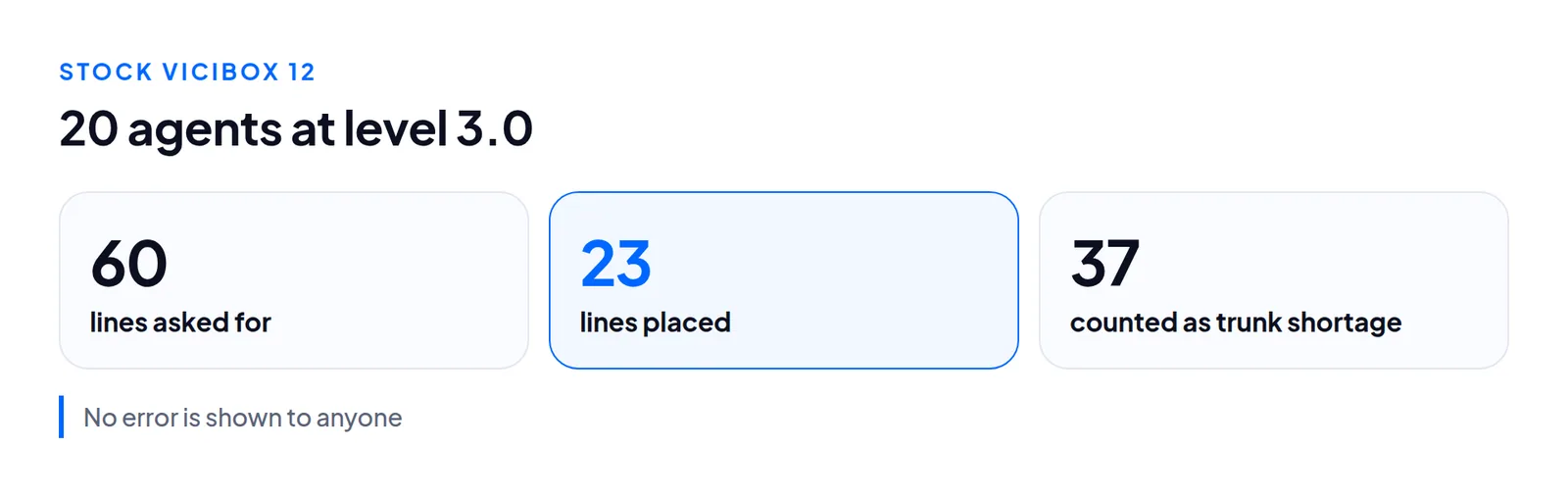
Nothing errors and no agent sees a message. Agents wait longer between calls, the supervisor raises the level, and nothing changes. A non-zero TRUNK SHORT while agents sit in READY is the signature.
SELECT server_ip, max_vicidial_trunks, outbound_calls_per_second FROM servers;

SELECT campaign_id, SUM(local_trunk_shortage) AS short
FROM vicidial_campaign_server_stats GROUP BY campaign_id;
Set it up, step by step
In VICIdial's admin
Open Admin, Servers, then your server. Screens are from our test server.

- Max Trunks: the cap on active lines across every campaign on the server. Raise it in steps and watch TRUNK SHORT for a shift.
- Max Calls per Second: spacing between new calls. A short attempt lasts around 15 seconds, so keeping 60 lines busy needs about four starts a second.
No restart is needed. The dialer re-reads Max Trunks every ten loops (about 25 seconds) and the pace every loop.
In the Trustane console
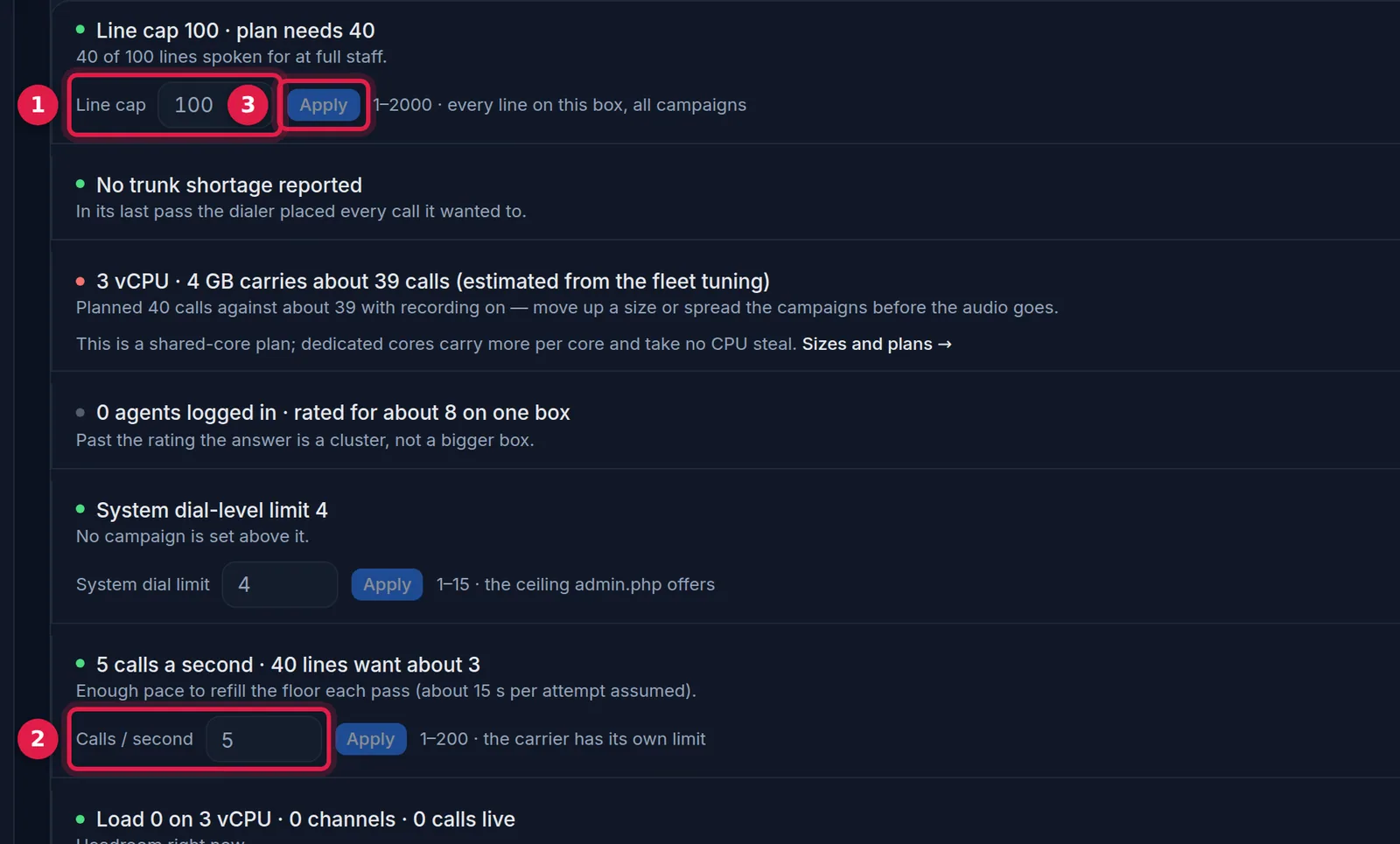
- Line cap: the server-wide line limit, the same limit as Max Trunks.
- Calls / second: the same pace setting.
- Apply: saves the change to the server.
A setting that looks like a limit
system_settings.auto_dial_limit is only the top of the drop-down in the campaign screen. Neither the dialer nor the adaptive script reads it. A level written through the API, a script or a direct update runs as written.
Limits that are rarely the problem
On our test box: 249 vicidial_conferences rows (one per agent session, a three-way call takes another), RTP ports 10000 to 20000 (two per leg, roughly 2,500 bridged calls), 65,536 open files for Asterisk, database max_connections 2,000. None binds before the line limit on a box this size. Watch the conference rows on a large floor.
Hardware: what we do not know
servers.sys_perf_log is N by default, so server_performance is empty on a stock install. Turning it on needs the writer process restarted, so do it when no calls are up. Until a box has measured itself, any channels-per-core number is a planning estimate. If someone quotes you a hard calls-per-core figure, ask what load, what codec, and whether recording was on.
What one floor asked for
We replayed a migrated call history minute by minute.
| Day | Calls | Peak concurrent | Agents at peak | Average call |
|---|---|---|---|---|
| Busiest day | 11,654 | 62 | 19 | 18 s |
| Second busiest | 11,819 | 60 | 23 | 19 s |
| A remote-agent day | 4,403 | 39 | 0 | 26 s |
That is about three lines per agent. A stock 23-line box would have delivered a little over one and looked like a bad list. This is one floor's history. It shows what one operation asked of its dialer, not what your hardware can carry.
Size your own floor
- Multiply full-staff agents by the highest level you allow, adaptive maximum included.
- Add remote-agent lines.
- Compare with the server limit and with your carrier's channel limit.
Questions people ask
Why did raising the dial level change nothing?
The server line limit was the cap. The level only changes what the campaign asks for.
Do I need to restart anything after changing Max Trunks?
No. The dialer re-reads it about every 25 seconds.
Next steps
Run the two queries. If trunk short is non-zero in staffed hours, raise the limit in steps. If nothing dials, start with the hopper. More lines also means more machines at the detector, so read AMD accuracy. Turn on sys_perf_log to plan from your own numbers. Our hosted capacity page does this arithmetic per campaign: order a server or see pricing.
VICIdial is a trademark of its owner. Trustane is an independent hosting provider.
Sources
- Trustane capacity findings, read from AST_VDauto_dial.pl
- Trustane floor report, the TRUNK SHORT counter
- Cover photo by Jep Gambardella on Pexels
Managed VICIdial hosting