How long does it take to build a VICIdial server? Our timings
Measured on two clouds. A VICIdial server from a prepared image was reachable in 32 to 72 seconds. A full install from scratch took 17 minutes.

To the point
From a prepared image, a VICIdial server was built, booted and configured in 32 to 40 seconds on one cloud and 60 to 72 seconds on another. A full install from a plain Ubuntu image took 17 minutes, 11 of them compiling Asterisk.
- Ready image on Hetzner: 32 to 40 s. On DigitalOcean: 60 to 72 s.
- Resizing 2 vCPU / 4 GB to 4 vCPU / 8 GB took 84 s and kept the address and data.
- An optional monitoring agent, on by default, added about 40 s to a 70 s build.
- Each figure ends when the server answers, not when your floor is dialing.
Three ways to build
Our pipeline runs on Hetzner Cloud. In October 2026 we ran the same process on DigitalOcean to see what carried over.
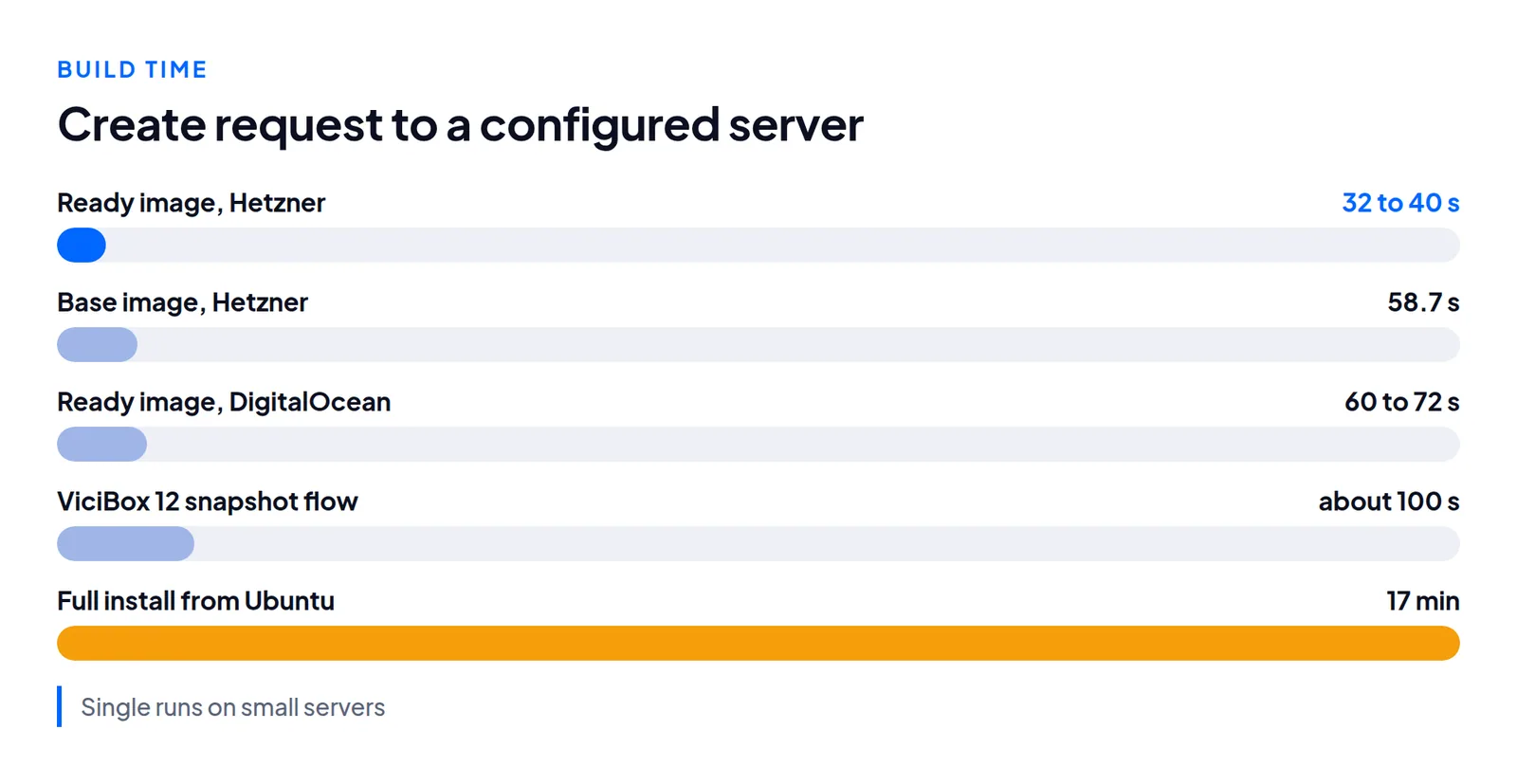
From scratch. A plain Ubuntu image, packages, compiled Asterisk, then the VICIdial code and database. On a 2 vCPU dedicated-CPU server this took 17 minutes: 5 minutes 44 seconds for packages and 10 minutes 56 seconds for Asterisk. Do it once, to make an image.
From a base image, then personalize. Snapshot after that install and build each server from it. A script sets what is unique: address, host name, passwords, certificate. Our first version took 80 seconds on Hetzner, and 58.7 after we removed our own waiting. The older ViciBox 12 snapshot flow takes about 100 seconds.
From a ready image. Install with a placeholder identity, record where each per-server value lives, and snapshot that. A new server needs only a re-identify pass of 3 to 10 seconds.
| Build | Cloud and size | Time |
|---|---|---|
| Full install | DigitalOcean, 2 dedicated vCPU | 17 min |
| ViciBox 12 snapshot, then provision | Hetzner | about 100 s |
| Base image, then personalize | Hetzner, small shared | 58.7 s (was 80 s) |
| Ready image | Hetzner, small shared | 32 to 40 s |
| Ready image | DigitalOcean, 2 dedicated vCPU | 60 s |
| Ready image | DigitalOcean, 2 shared vCPU, 4 GB | 72 s |
| Ready image, provider's default options | DigitalOcean | 110 s |
Other timings: snapshot of a prepared server about 50 s, copying it to another region about 10 min per region, baking a ready image on Hetzner about 3 min, and an acceptance test with 5 reboots 15 min 42 s.
Where the seconds go
Most of a ready-image build is not ours. The cloud creating and booting took 25 to 33 seconds of Hetzner's 32 to 40, and 36 to 45 seconds of DigitalOcean's 60 to 72. Re-identifying took 3 to 10.
The part worth examining is your own waiting. Our 80 second build became 58.7 without making any step faster. It had polled for boot every 8 seconds, created DNS only after boot, and polled the personalize step every 10 seconds. We replaced those with a one-second probe, DNS created during boot, and one blocking session.
What broke on the second cloud
The install scripts ran on DigitalOcean unchanged. Everything that broke was in the thin layer that calls the cloud's API:
- The create response does not contain the address. We polled 24 to 48 seconds until the server was active.
- A power-off reported done while the server still showed active. Poll for the off state before a snapshot.
- The snapshot call does not return the image ID. Read it from the snapshot list.
- An SSH key passed only through user data left the root password expired, and every login was refused until the key was also registered with the account.
- Labels work differently, so finding our images needed another mechanism.
These are assumptions baked in by the first cloud, not defects in either.
Resize is fast and does not finish the job
Growing 2 vCPU / 4 GB to 4 vCPU / 8 GB took 84 seconds: 11 to power off, 50 to resize, 13 to power on. We chose the CPU-and-memory-only option, which is reversible. DigitalOcean's documentation says the disk option "permanently increases" the disk and that "you cannot decrease the size of a Droplet's disk". Address, data and host name survived.
Nothing inside the server adjusted. Database buffers, PHP's memory limit and the web worker limit were all still set for 4 GB. After a resize, re-run your tuning and check the line limit in lines per agent.
Network facts for the second cloud
On our account, fresh servers could send SIP, but outbound mail on ports 25, 465 and 587 was blocked, so a server that emails reports needs a relay on another port. No reverse DNS was set.
What we did not measure
Live calls on the DigitalOcean builds, a real certificate on them, larger sizes, and multi-server clusters.
Questions people ask
Does a 40 second build mean a working call center?
No. After the server answers you still need carriers, numbers, data and a line limit above the stock default.
Can I grow a server later?
Yes. Our resize took 84 seconds and kept the address, but we had to re-tune afterwards.
Next steps
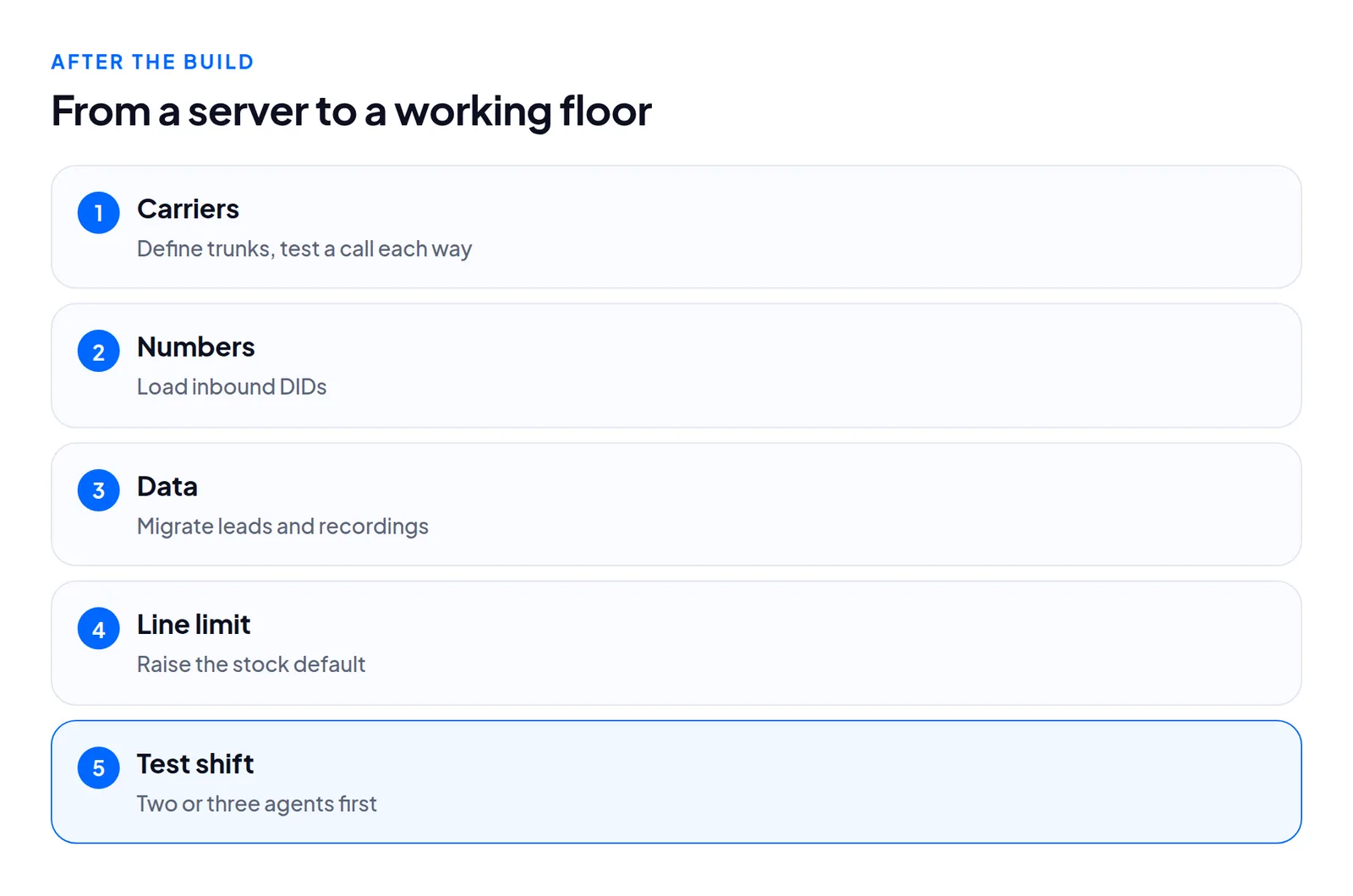
- Define trunks and test a call each way: PJSIP carrier setup.
- Load numbers with bulk-adding DIDs.
- Moving from another server? That is measured in hours, and we do it with you: migration.
- Run a test shift with two or three agents.
To time the fast part yourself, order a server or see VICIdial hosting.
VICIdial is a trademark of its owner. Trustane is an independent hosting provider.
Sources
Managed VICIdial hosting