How to block a phone number in VICIdial, inbound and DNC
Block a caller in VICIdial from the live floor: one right-click puts the number on an inbound filter list and on the internal DNC list. Five steps, with undo.

To the point
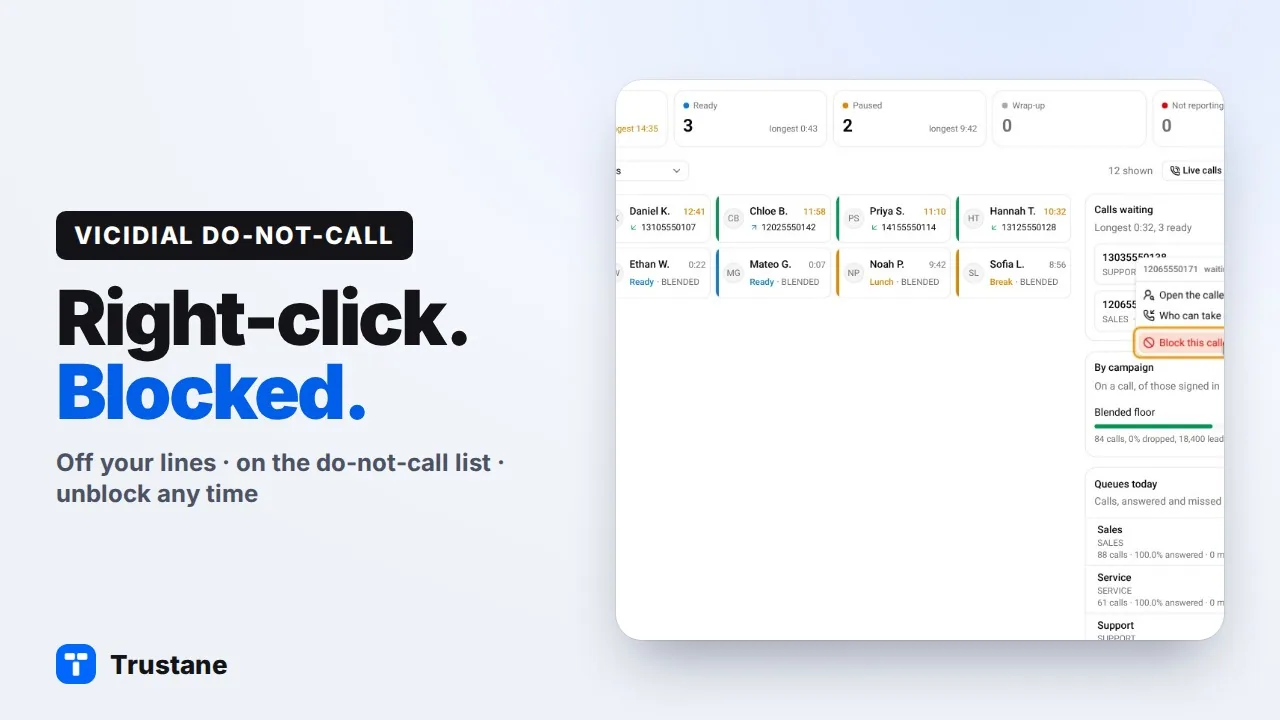
To block a phone number in VICIdial you need two lists: one that stops the number calling in, and one that stops your campaigns dialing it. In the Trustane console that is one right-click:
- On the Floor, right-click the caller and pick Block this caller.
- Read what the dialog shows before anything is written: the list, and what happens to its calls in.
- Press Block.
- See it, and undo it, under Numbers › Blocked callers.
- Tick Agents can block callers if agents should do it themselves.
Plays from YouTube when you press Play. Google's privacy policy applies.
The pictures come from our demo account. Its phone numbers are made up.
Why one block needs two lists
VICIdial keeps inbound and outbound apart. A filter phone group is a list of caller numbers that a line checks when a call comes in. The internal DNC list is what the dialer checks before it dials. Neither list reads the other, so a number on only one of them is half blocked. How the inbound filter works has the detail.
1. Right-click the caller on the Floor
The Floor lists the callers waiting in your queues. Right-click a number and pick Block this caller.
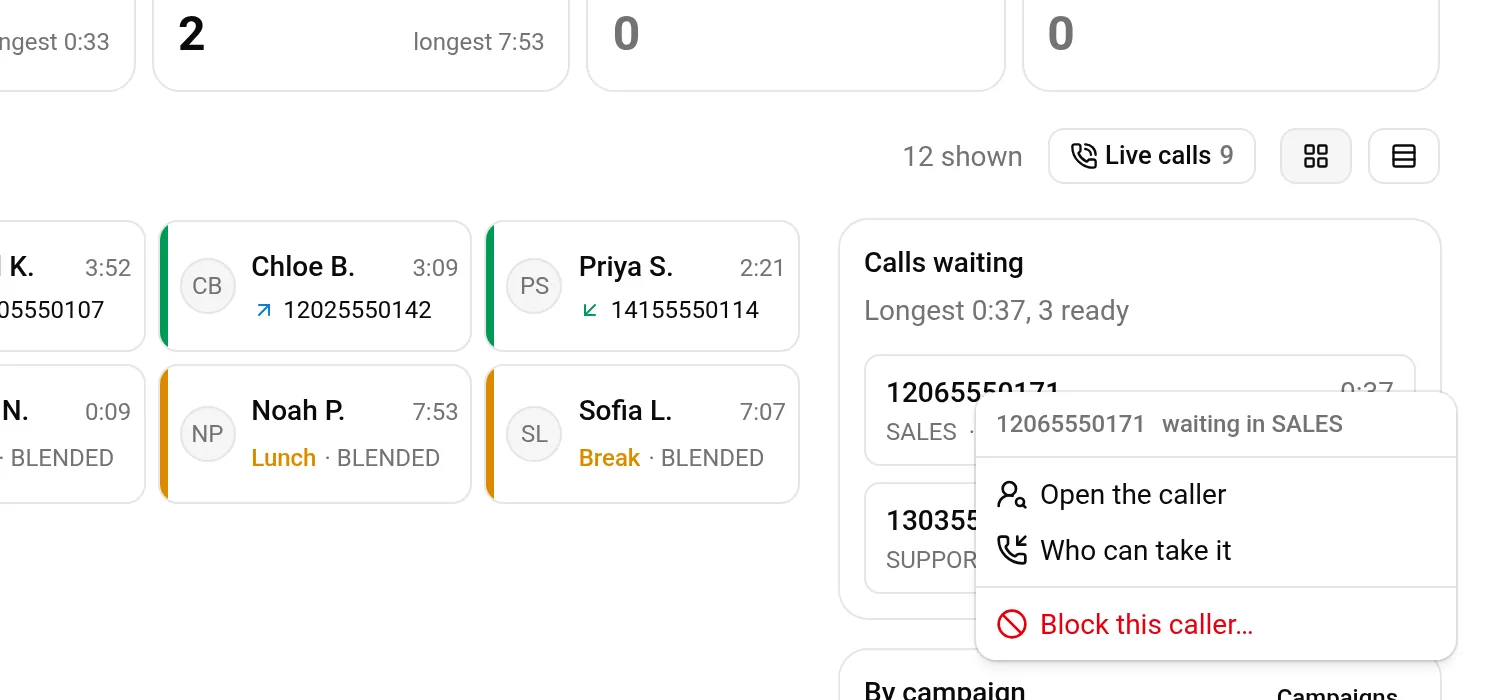
The same choice is on the caller's own record, and on an agent's menu when the inbound number they are on has rung the floor several times today.
2. Read what it will do
Nothing is written yet. The dialog shows what the block will do:
- List: the server's block list. You can pick another caller list here.
- Calls in: hung up, on the lines that check that list.
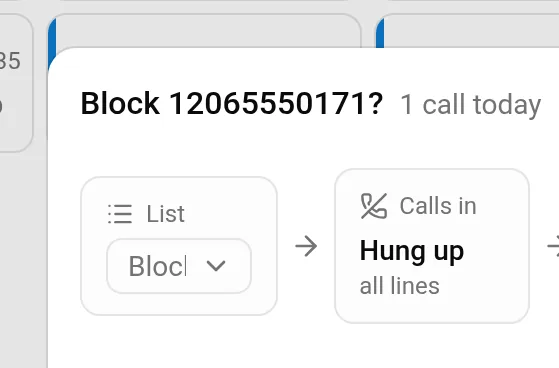
The block also puts the number on VICIdial's internal DNC list. What that list stops depends on the campaign. VICIdial skips a number on it when it auto-dials, as long as the campaign's Use Internal DNC List is Y (the default) or AREACODE. A manual dial is checked only if the campaign's Manual Dial Filter includes DNC, and that setting ships as NONE.
3. Press Block
One press does all of this. The numbers go in through VICIdial's own API, and the lines are set directly on the server:
- The number goes on the block list twice, with and without the leading 1. The inbound filter matches the number exactly, so 2065550171 and 12065550171 are two entries.
- Both forms go on the internal DNC list.
- On the first block, every active line that has no caller filter is set to check the block list and to send a match to extension 8300, which hangs up in VICIdial's default dialplan.
The confirmation says how far it reached: "12065550171 is blocked and on the do-not-call list. 1 of 1 lines turn it away."
A line that already has a caller filter of its own keeps its own action: the block list is added to what that line checks, and the confirmation counts those lines apart.
4. See it, and undo it
Numbers › Blocked callers lists every blocked number, the day it was added, and under Turned away how many of its calls a caller filter caught in the last 90 days.
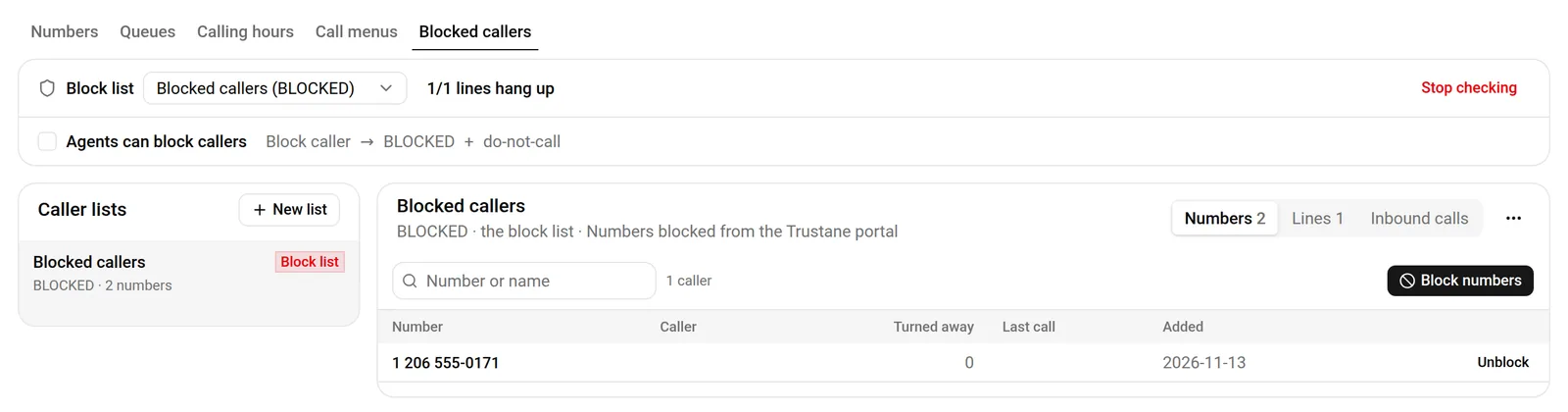
Unblock takes the number off the block list, in both forms. Its next call is answered again. It stays on the internal do-not-call list; take it off under Campaigns, Do not call, only if it never asked not to be called.
To block many numbers at once, press Block numbers and paste them in.
5. Let agents block a caller
Tick Agents can block callers on the same page.

That adds one status, Block caller, to the server's own status table, so it shows as a disposition on our agent screen and on VICIdial's agent screen alike. VICIdial builds an agent's disposition list when they log in, so agents see it after their next login.
When an agent on our screen picks it, the caller is blocked as the disposition is taken. A block taken on VICIdial's own agent screen is picked up by a sweep, and the page shows how many are waiting for it.
The same block by hand, in VICIdial's admin
If you run VICIdial without our console, these are the screens:
- Inbound → Add Filter Phone Group: give it an ID and a name.
- Inbound → Add FPG Number: pick the group and enter both forms of the number, one per line.
- Inbound → Show DIDs → the DID: set Filter Inbound Number to GROUP, pick the Filter Phone Group ID, set Filter Action to EXTEN and Filter Extension to 8300.
- Lists → Add DNC Number: add both forms to the internal list.
- Repeat step 3 for every other DID that should turn the caller away.
What a block does not do
- It is your server's own list. It is not a national registry and it scrubs nothing against one.
- It does not change what a line with its own filter does with a match.
- If a DID uses VICIdial's Clean CID Number setting, the number is rewritten before the filter sees it, so check which form that DID compares.
Next steps
- VICIdial DNC lists, explained: the internal list, campaign lists and how a number gets on them.
- Assign in-groups to agents from the floor.
- Start a server, free for 7 days.
VICIdial is a trademark of its owner. Trustane is an independent hosting provider.
Sources
- Trustane console, the Block this caller dialog
- Trustane console, the Blocked callers page
- How a block is written to the server, and undone
- How the do-not-call half is written
- VICIdial SVN r4038, how a DID filters its callers
- VICIdial SVN r4038, the API functions for filter groups and DNC
- VICIdial behaviour checked line by line, 13 November 2026
Managed VICIdial hosting