Assign VICIdial in-groups to agents from the floor
Change which VICIdial in-groups a signed-in agent takes from Trustane's Floor, one agent or one in-group at a time, and what each way saves.

To the point
Trustane's Floor changes which VICIdial in-groups a signed-in agent takes, in two ways. Right-click an agent to set which of their campaign's in-groups they take, or right-click an in-group to add or take off several people. Both go through VICIdial's agent API function change_ingroups, after the server checks VICIdial's rules.
- Move to queues, one agent: applies to their session straight away. It is also saved on their user record, though the agent replaces that the next time they sign in.
- Add or remove people, one in-group: up to 40 people per click, for this session only.
- Only in-groups the agent's campaign allows can be picked.
- The campaign must take inbound calls and must not dial MANUAL.
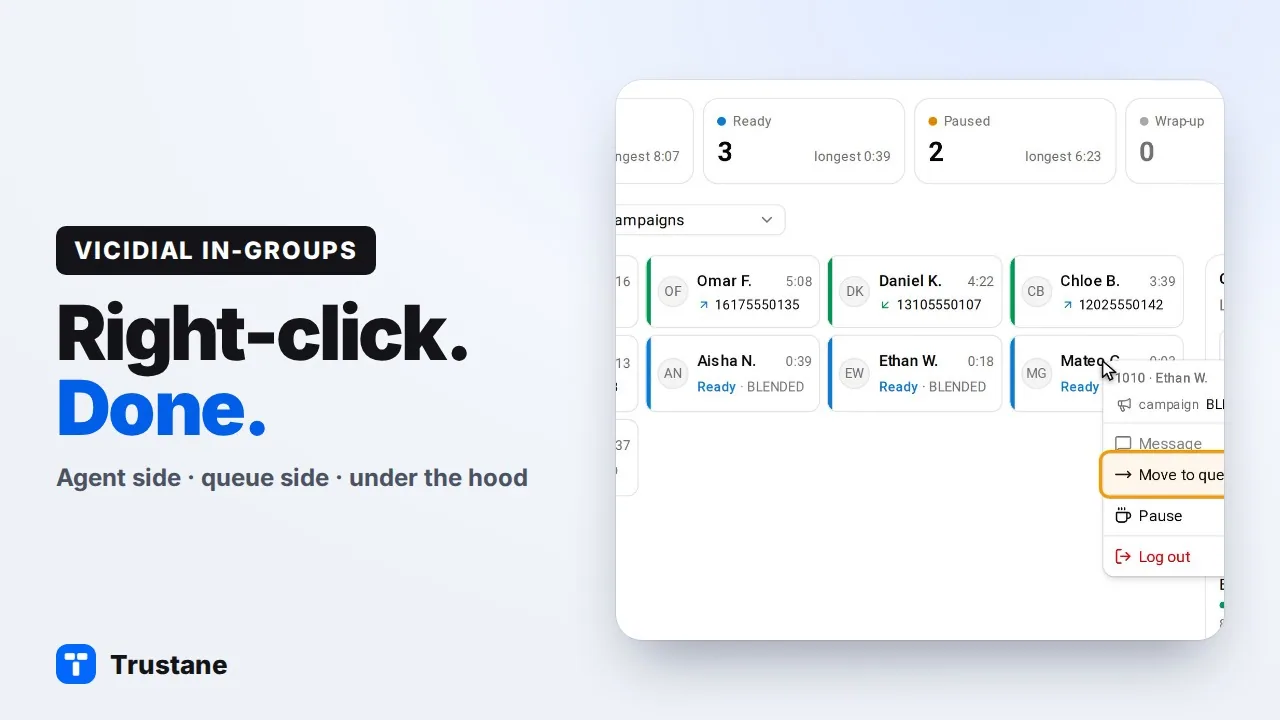
Plays from YouTube when you press Play. Google's privacy policy applies.
The console calls in-groups "queues". The pictures are from our demo account. How VICIdial then picks the agent for each call is in Next Agent Call explained.
Before you start
The server checks three things and names the one that fails:
- The agent is signed in, and their screen is reporting. Their agent screen must have checked in within the last 60 seconds. VICIdial applies an in-group change when that screen next checks in, so a screen that has gone never receives it.
- Their campaign takes inbound. VICIdial's Allow Inbound and Blended is Y, and the dial method is not MANUAL.
- The in-group is allowed. It is in that campaign's Allowed Inbound Groups.
Read-only team logins, and accounts locked for an unpaid balance, are refused.
One agent: Move to queues
- Open the server's Floor.
- Right-click the agent's tile. In the table view, each row also has a ⋯ button with the same menu.
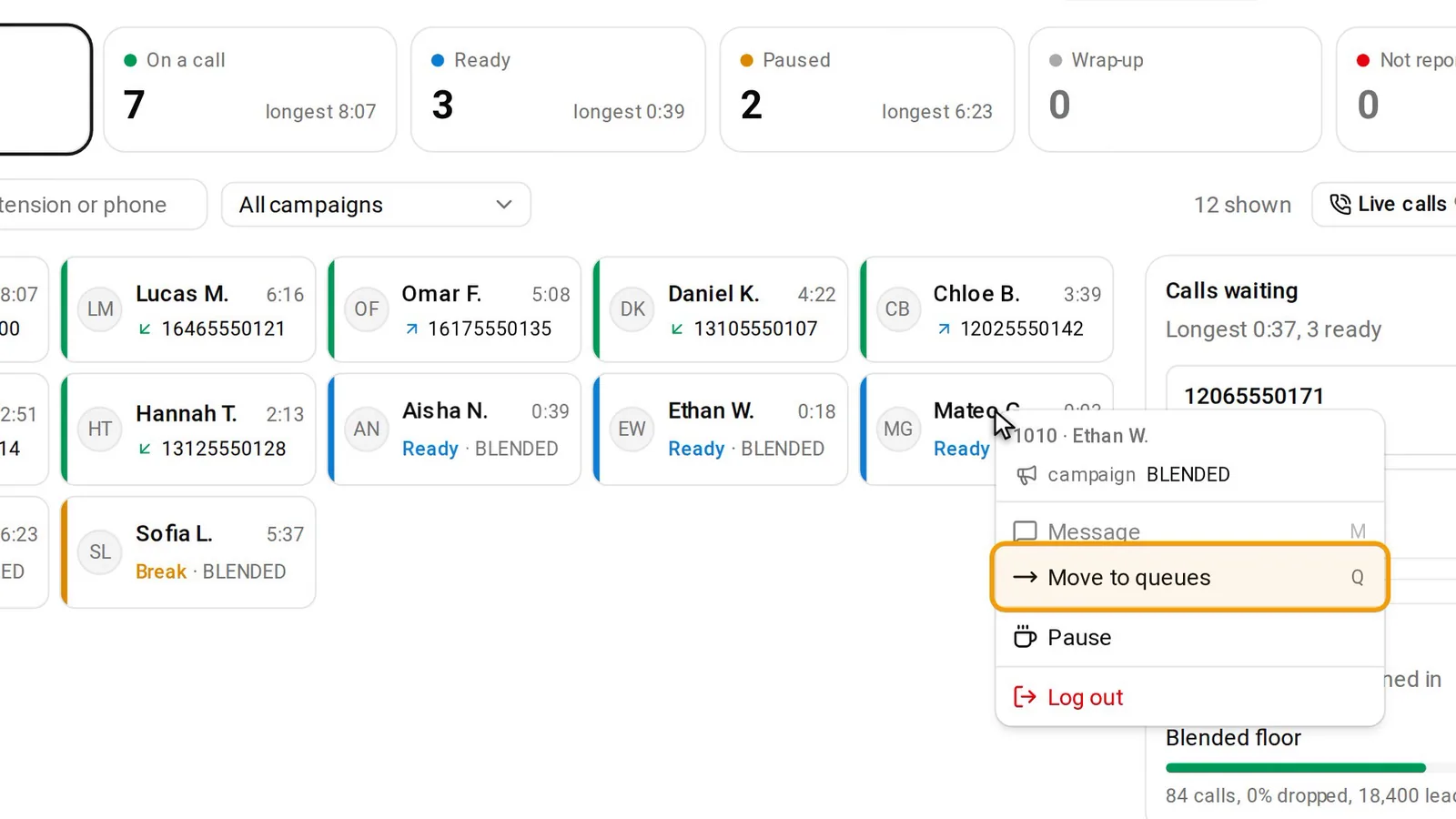
For an agent who is ready, paused or in wrap-up, the menu is Message, Move to queues, Pause or Take off pause, and Log out. On a call it adds Listen, Whisper, Barge and Hang up the call.
- Choose Move to queues. A dialog opens: "Which queues 1001 takes", with the agent's ID.
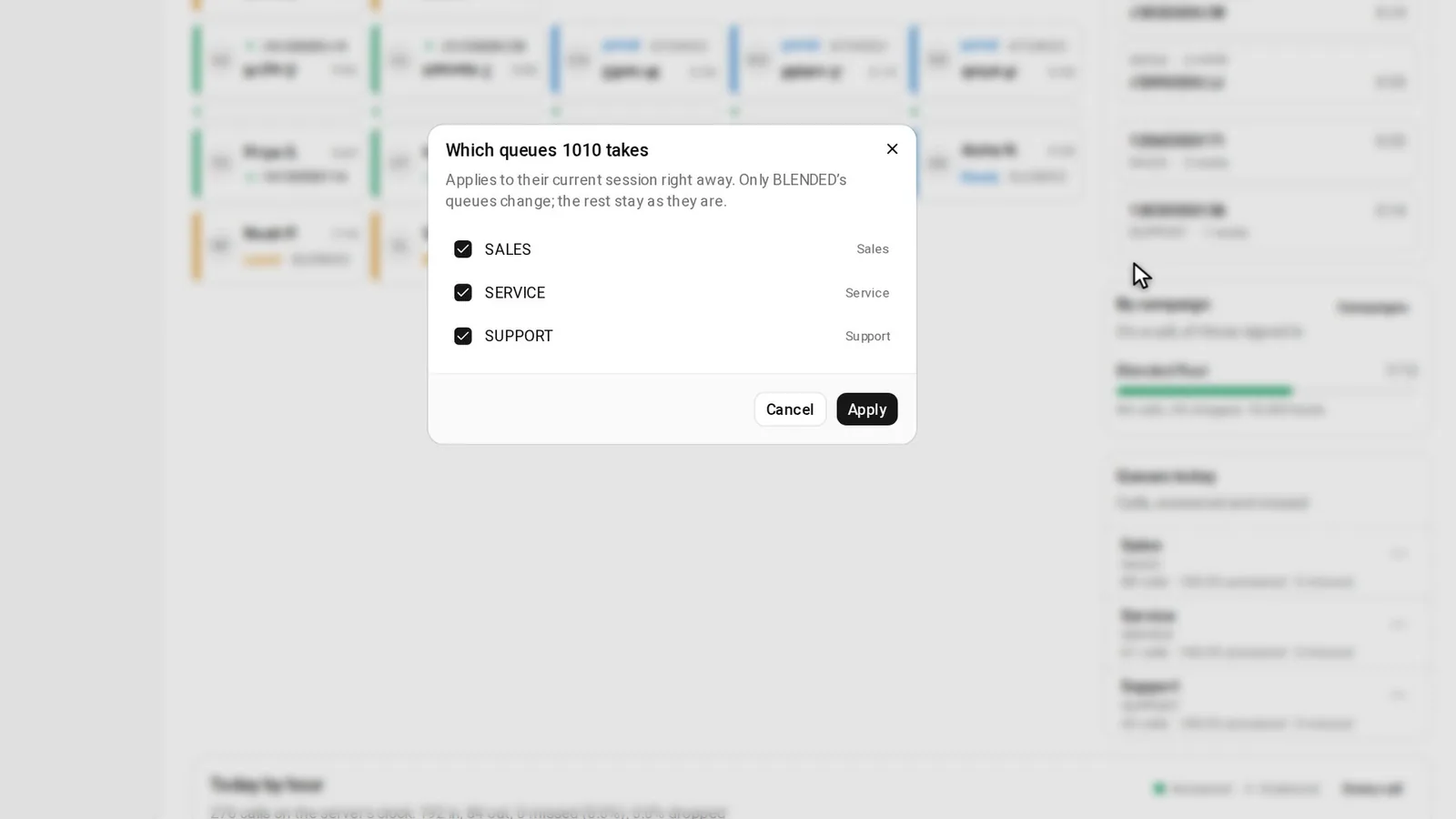
- Tick the in-groups they should take. The list holds their campaign's in-groups only, ticked as their session has them now. An in-group that is switched off shows "off" after its name.
- Press Apply. With nothing ticked, the button reads "Take off every SALES queue", with your campaign's ID, and takes them off that campaign's in-groups.
What Apply changes
Two steps, in this order:
- The live session. One
change_ingroupscall withvalue=CHANGEandset_as_default=NO. Whether they also take outbound calls (blended) stays as it was. - The saved list, only if step 1 worked. Their VICIdial user record (
vicidial_users.closer_campaigns) is rewritten for this campaign's in-groups only. In-groups they keep for other campaigns are left alone. A ticked in-group they had no rank row for gets one (rank 0, grade 1, no daily limit), and VICIdial's admin log gets an entry with the code "IN-GROUPS KEPT FROM FLOOR FROM TRUSTANE".
If the save fails, the confirmation says "Applied to their session, but NOT kept".
VICIdial's API can save a change itself with set_as_default=YES, but that writes the session's whole list over the saved one, and overwrites their Closer Default Blended setting too. Saving only this campaign's part is our choice, so an agent who works two campaigns keeps the other one's in-groups.
One in-group, many people: Add or remove people
- On the Floor, find the Queues today card. It lists every in-group with a call today: calls, the share answered, and calls missed.
- Right-click an in-group, or press its ⋯ button. The menu offers Who takes it, Add or remove people, Its calls today, Open on Numbers and Open in admin.php.
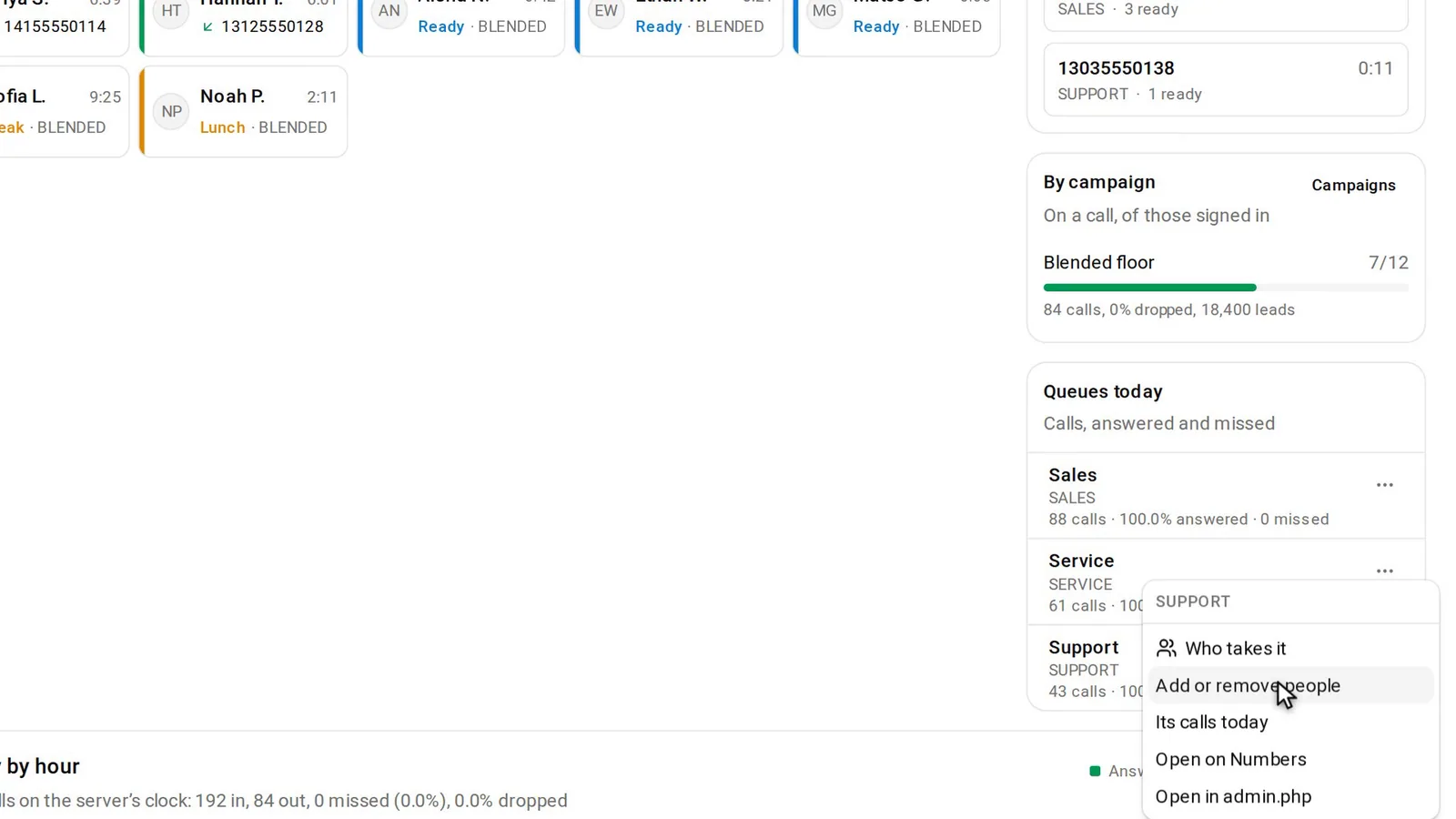
- Choose Add or remove people. The dialog "People on SUPPORT" lists everyone signed in, in three groups.
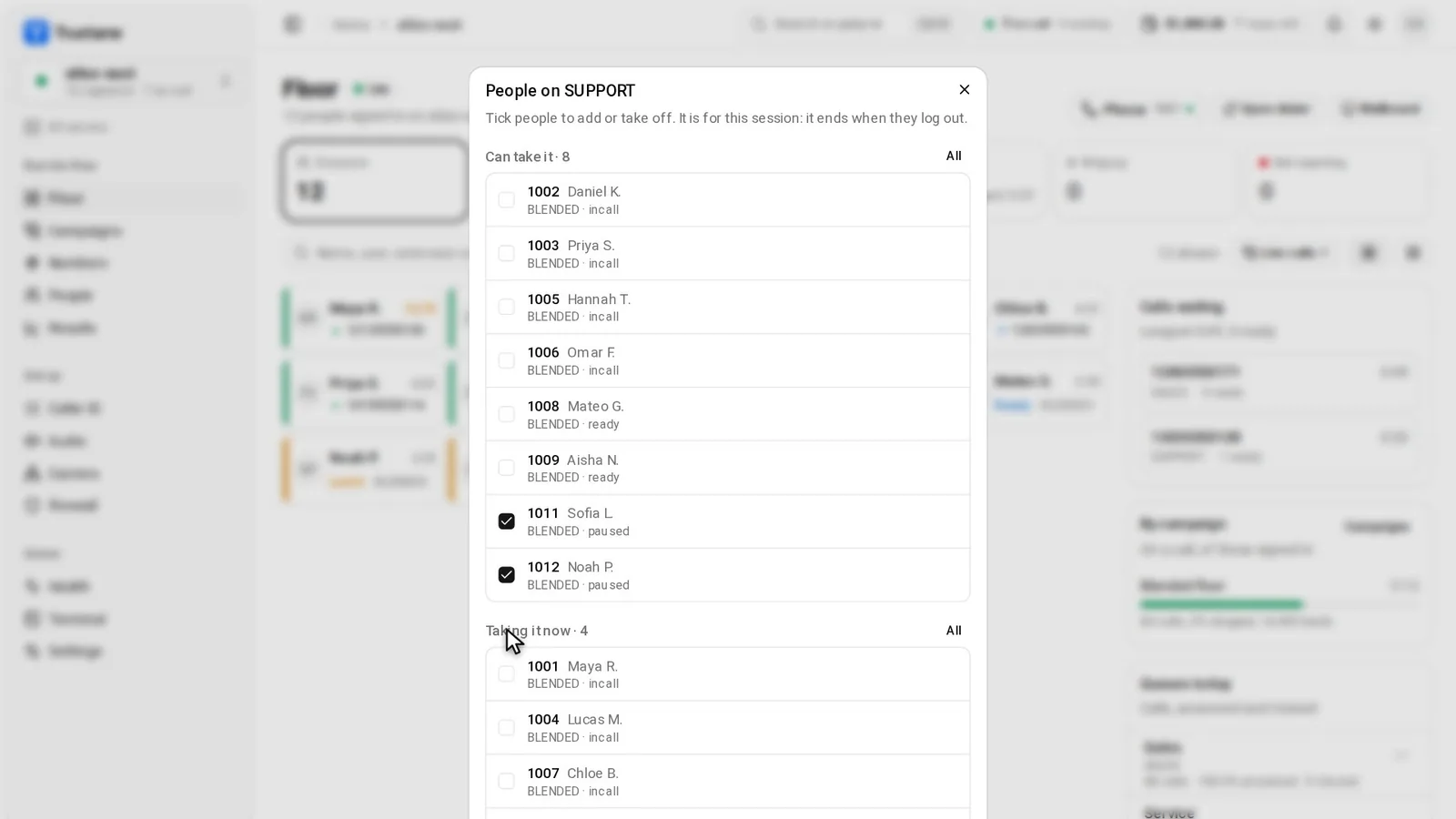
- Can take it: their campaign allows this in-group, and they are not on it yet.
- Taking it now: on it, with a screen that is reporting.
- Cannot be changed: greyed out with the reason, such as "the in-group is off", "their agent screen is not reporting" or "not allowed on SALES".
- Tick people, then press Add 3 or Take 2 off. The numbers follow what you ticked, and a section with two or more people has an All button.
Each person is one change_ingroups call with value=ADD or value=REMOVE and set_as_default=NO, checked again on the server just before. Nothing is written to the user record, so the change ends when they log out, as the dialog says. The confirmation reads, for example, "3 people added to SUPPORT".
Which one to use
| You want | Use |
|---|---|
| One agent's in-groups, now and on their record | Move to queues |
| More people on one busy in-group for this shift | Add or remove people |
| To see who is on an in-group | Who takes it |
Who takes it narrows the people on the Floor to those taking that in-group. A waiting caller marked "nobody ready" has the same link.
When the Floor says no
| Message | What it means |
|---|---|
| "1001 is not signed in right now" | There is no live session to change. |
| "1001's agent screen is not reporting, so a change would never reach it" | No check-in for 60 seconds. |
| "SALES takes no inbound calls, so 1001 cannot take in-groups" | Allow Inbound is off, or the campaign dials MANUAL. |
| "SALES has no in-groups to choose from. Add them on the campaign first." | The campaign's Allowed Inbound Groups is empty. |
| "a change for 1001 is still being applied, try again in a few seconds" | Their screen has not picked up the last change yet. |
The same jobs in admin.php
VICIdial's real-time report changes a signed-in agent's in-groups too. Click the "+" beside the user, then choose Add, Remove or Change, with an option to save the result as their default (manager manual, page 352). Your admin user needs View Reports, API Access, Change Agent Campaign and Modify Users set to 1 (page 353).
The saved lists are on the user page, under Inbound Groups, and on the in-group page. Its AGENT RANKS FOR THIS INBOUND GROUP grid ticks many agents at once and sets each one's rank, grade and daily limit. Open in admin.php on an in-group's menu opens that page. As the warning above says, a saved list only shapes the next login for agents at Agent Choose Ingroups 0.
Questions people ask
Does Move to queues change whether they take outbound calls?
No. Blended stays as their session had it, and it is always off on an INBOUND_MAN campaign.
Why is an in-group missing from Queues today?
The card lists in-groups that have had a call today. For a quiet one, use Move to queues on each agent, or the in-group page in admin.php.
Next steps
Change one agent, then click their tile: the panel's "Takes" line shows their in-groups now. How VICIdial routes calls inside an in-group is in Next Agent Call explained, and the screen supervisors watch is in the real-time report. The Floor is part of the Trustane console: see VICIdial hosting and pricing.
VICIdial is a trademark of its owner.
Sources
- VICIdial agent API documentation, change_ingroups
- Trustane console, the Floor's agent menu and in-group dialog
- Trustane console, the in-group roster dialog
- Trustane console, the in-group changes and the rules checked on the server
- Trustane console, saving a Floor change on the user record
- VICIdial SVN trunk r4037, in-group selection at agent login
Managed VICIdial hosting