The VICIdial real-time report, column by column
Where each number on VICIdial's real-time screen comes from, including dropped percent, trunk short and fill, and the agent states that cause confusion.

To the point
Read VICIdial's real-time screen top block first, then the agent grid. The top block says whether the dialer is producing calls. The grid says what agents do with them. Most "the dialer is broken" calls are one number misread.
- The screen refreshes every 40 seconds by default, so it is a snapshot.
- Dropped percent is drops divided by answered calls, not by all calls dialed.
- On a stock ViciBox 12, trunk short means the 23-line limit (
max_vicidial_trunks) refused a call. - The all-campaigns drop percent averages each campaign's own percentage.
The top block
Dialable leads. Leads in the campaign's lists that the dialer may call right now, given list status, dial statuses and call times. The hopper script writes it. If it is zero, the dial level cannot help. See why VICIdial is not dialing.
Hopper. Leads loaded and ready, meaning status READY, RHOLD or RQUEUE. An empty hopper with dialable leads is a fill problem. A full hopper with nothing dialing points at lines or agents.
Dial level. Lines wanted per available agent. At 3.0 it wants about three lines per agent counted. An adaptive method moves it, capped by the campaign maximum. Stuck at 1.0 with agents waiting? Check the dial method.
Trunk short and trunk fill. Trunk short counts the times the dialer wanted a line and the server was at its limit, max_vicidial_trunks, shipped at 23. Trunk fill sits in balance_trunk_fill. We read where it is computed but did not test what moves it, so we do not interpret it.
A trunk short figure that climbs while agents wait is the most common silent capacity problem we know of. The setting is re-read about every 25 seconds. See lines per agent.
Where the same numbers live
Screens from the test server, campaign SUNQ4 (Sunline Solar Q4 callbacks). Numbered markers map to the list under each picture.
In the Trustane console
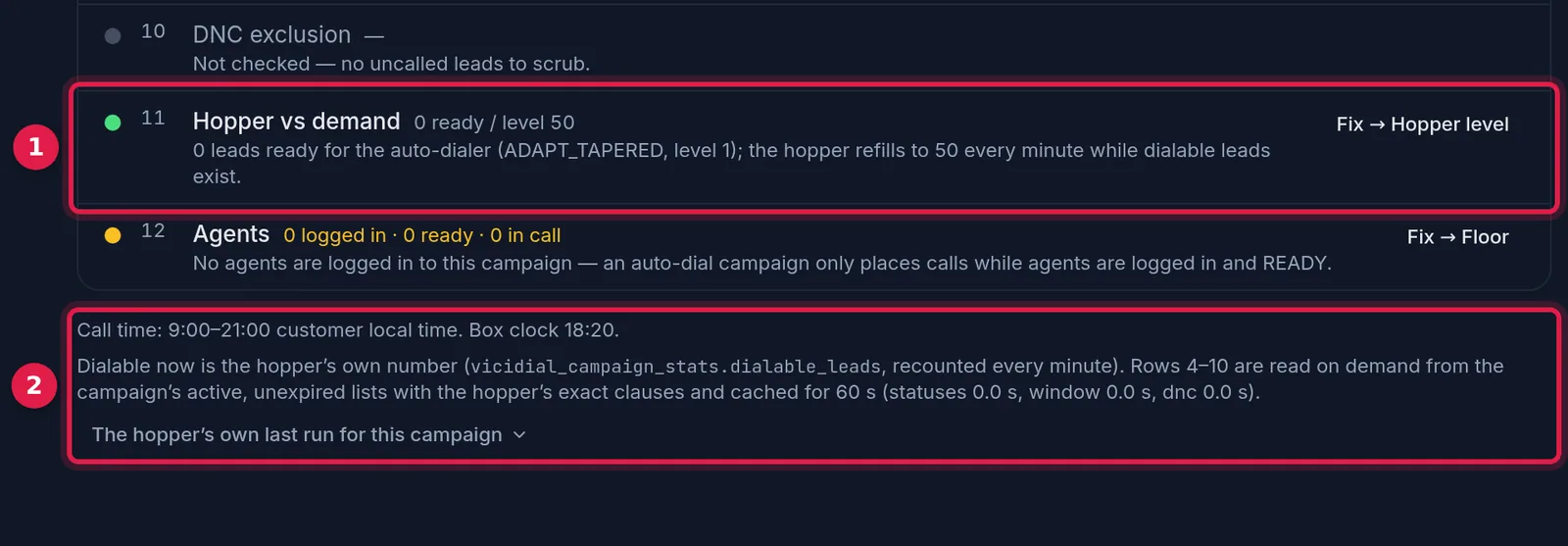
- Fix → Hopper level: a one-click route to the hopper setting when it is the cause.
- The hopper’s own last run for this campaign: what the hopper script reported on its last pass.
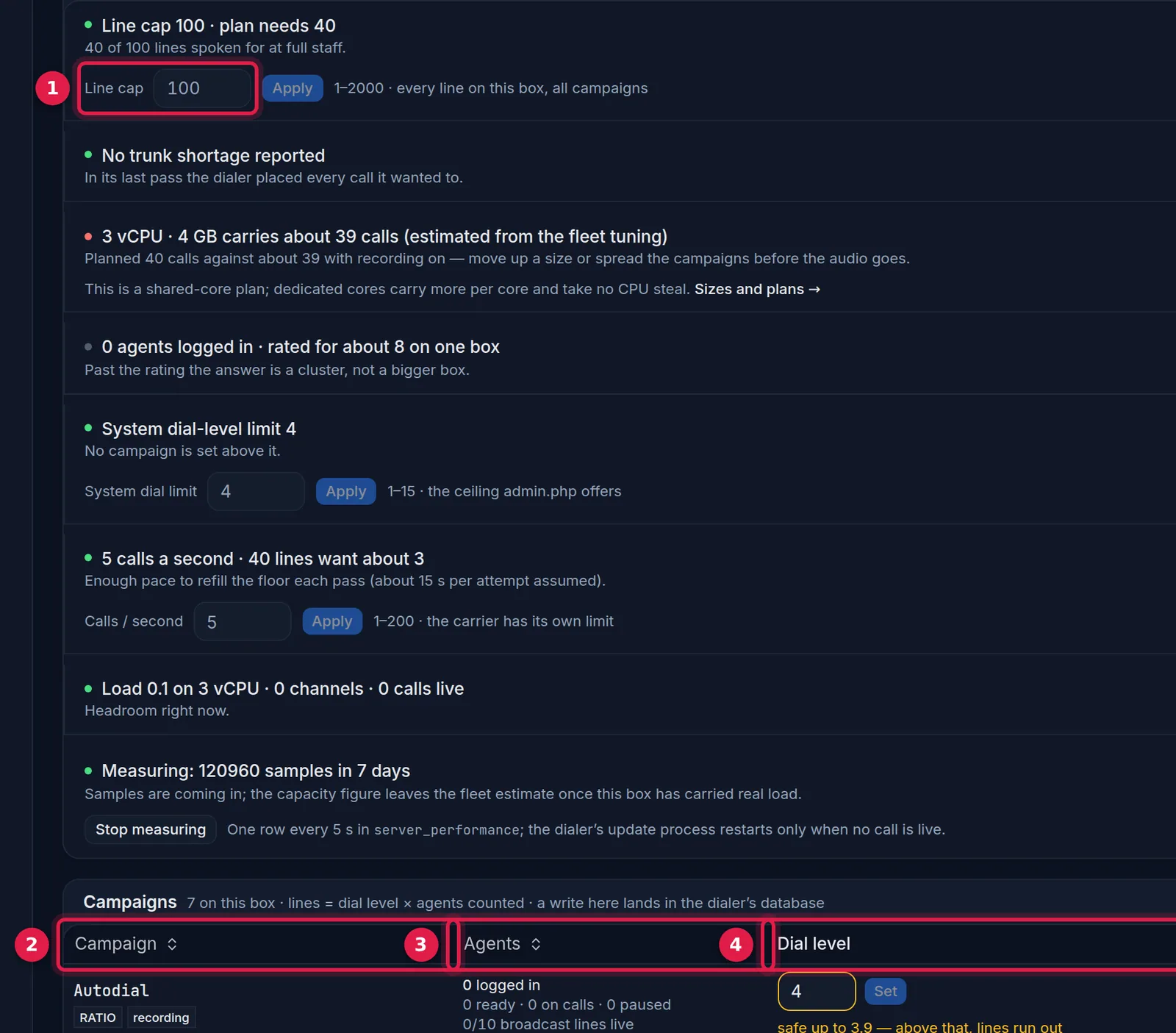
- Line cap: the server's line limit, read from the box.
- Campaign: choose the campaign to model.
- Agents: how many agents the dialer counts.
- Dial level: the multiplier from the top block.
- Lines: dial level times agents, which you compare with the cap.
Calls today: answered and dropped
- Answered counts calls whose final status is flagged as a human answer. A custom status you create is not counted until you set the flag.
- Dropped counts
DROPandXDROP: a person answered and no agent was free.PDROPis separate and is not part of the abandonment figure. - Dropped percent in VICIdial's scripts is drops divided by answered calls. Dividing by all calls dialed gives a smaller number and flatters you.
The manual describes a limit of 3 percent over 30 days for the US. Whether a rule applies to your calling is for you to look up. The screen shows today's figure, so a good day does not prove compliance.
The agent states
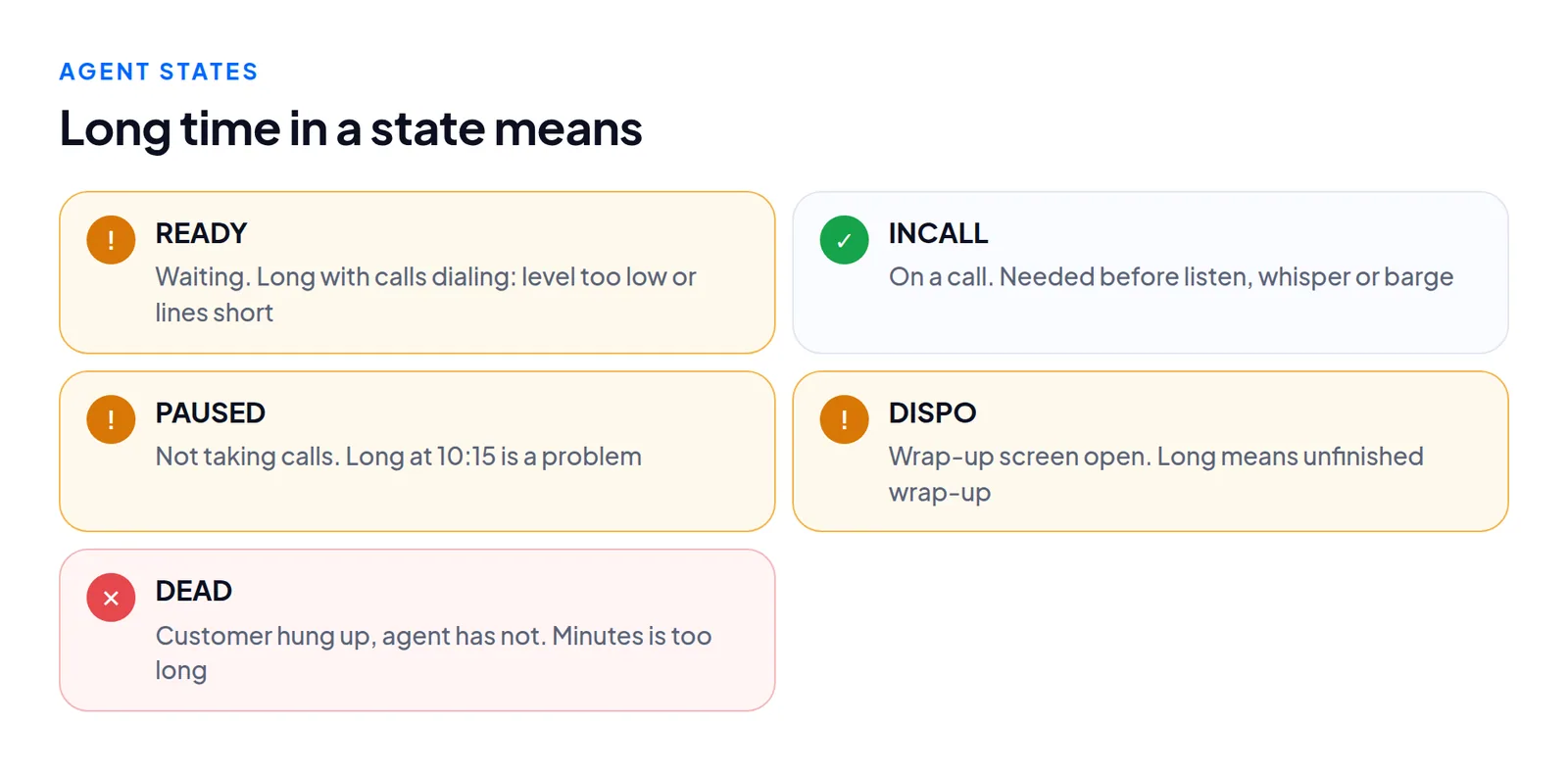
CLOSER, QUEUE and similar are inbound or transfer states and vary by build. The manual describes yellow for paused, blue for waiting, white for on a call and black for dead, darker the longer the time. Treat colour as a prompt to read the time column.
PAUSEDlong. Normal at break time, a problem at 10:15 on a busy morning.DISPOlong. Wrap-up is not being finished. The average wrap-up figure is disposition plus dead time per call.DEADlong. The customer left and the agent has not hung up. Seconds are normal, minutes are not.READYlong with calls dialing. The level is too low, or lines are short. Go back to the top block.
Agents waiting while calls ring means the team is too large for the level. Calls waiting while agents are INCALL means too small, and that is when drops occur.
Acting from the report
Supervisors can listen, whisper or barge from this screen, if the agent is in INCALL. A row with no check-in for a minute, or two rows for one user, makes it unclear which conference you would join. If "listen" does nothing, check for a second login. Changing in-groups here needs four permissions, so the control is often greyed out for a manager who has three.
Where the report misleads
- It is a 40 second snapshot. A burst of drops shows late.
- The day boundary is the server's, not necessarily your floor's time zone.
- The grid shows who is logged in to the dialer, not who is at the desk. If several agents lag at once, suspect the network: LAGGED agents.
- A call dispositioned with the wrong status is counted wrongly everywhere.
Columns that differ between builds and the inbound blocks are left out, since we measured outbound campaigns. If your screen shows a column not described here, read its help tooltip before assuming.
Questions people ask
Why is my drop percent different from the report I built?
Probably the divisor. VICIdial divides by answered calls. If you divide by all calls dialed the result is smaller.
Why does the all-campaigns drop percent look wrong?
It is an average of each campaign's percentage, so tiny campaigns weigh as much as large ones.
Next steps
Write down the top block figures at 10:00 for a week, check that every answered status is flagged, compute dropped percent per campaign, and put trunk short next to the line limit. For this view without opening the admin, see our wallboard or VICIdial hosting.
VICIdial is a trademark of its owner. Trustane is an independent hosting provider.
Sources
- Floor report, definitions read from VICIdial's report and dialer scripts
- Manager manual findings, real-time report behaviour
- Capacity findings, where trunk shortage is counted
- Cover photo by Keysi Estrada on Pexels
Managed VICIdial hosting