VICIdial root access: your server's terminal in the browser
Get VICIdial root access from the browser: open the server's terminal with your password and a code, see who is on SSH, read the log, manage keys.

To the point
For VICIdial root access on a Trustane server, open Terminal in the console:
- Enter your Trustane password and a code from your authenticator app.
- Press Open terminal. A root shell opens in the page.
- Use the other tabs to see who is connected over SSH, read the SSH log and manage the keys.
Plays from YouTube when you press Play. Google's privacy policy applies.
The pictures come from our demo account. The server, the people and the addresses in them are made up.
Before you start
The terminal needs two-step sign-in on your login. If it is off, the page says so and links to the setting. Turn it on once, with an authenticator app.
The terminal is for the account owner. A root shell can change anything on the server, so it is not a team role.
1. Open the terminal
Open your server in the console and choose Terminal. The form names the server and tells you four things before you sign in:
- You are root, and you can change anything.
- The session is recorded. You and Trustane can replay it for 30 days.
- A fix after your change is billed per task, and quoted first.
- The files Trustane manages should be left alone: the firewall, the sign-in gate, SSH and our settings files.
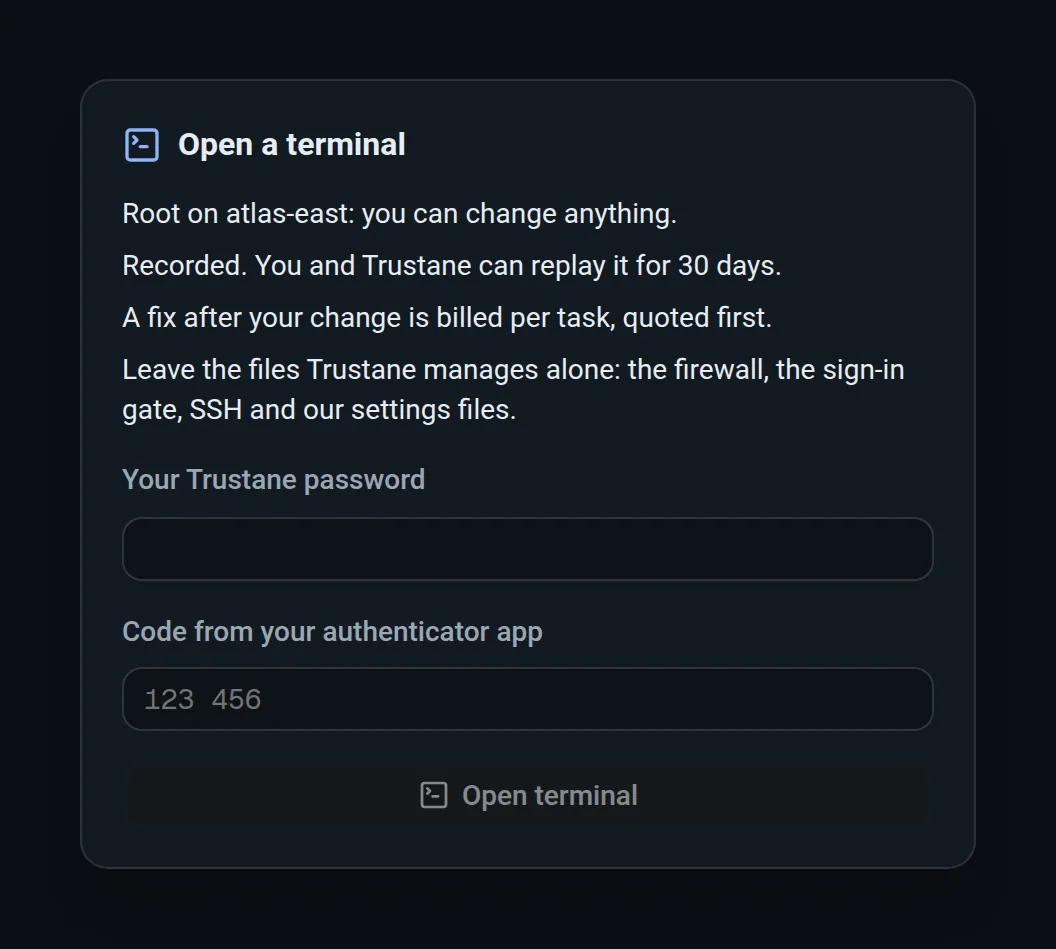
Type your Trustane password and the six-digit code, then press Open terminal. The first time, you also tick the box for the SSH access policy.
2. Work in the shell
The shell runs in the page as root. Two buttons above it move files:
- Upload sends a file from your computer to the server.
- Download fetches a file from the server by its path.
A file can be up to 100 MB each way. While a file moves, a bar under the shell shows its name and how far it has got, and you can cancel it.
A session closes by itself after 15 minutes with no typing, and at 4 hours at the latest. You can have two sessions open on one server at a time.
3. Replay a session
The Sessions tab lists each terminal session: when it opened, who opened it, from which address, how long it lasted and how it ended. It also shows any files that went up or down.

Each session has a recording for 30 days. After that the recording is removed. The line in the list stays for a year.
4. See who is connected
Connected now lists the SSH sessions on the server at this moment, whoever opened them. For each one you see the user, the address it comes from, how it signed in, how long it has been on and what it is running. The list checks again every 10 seconds.
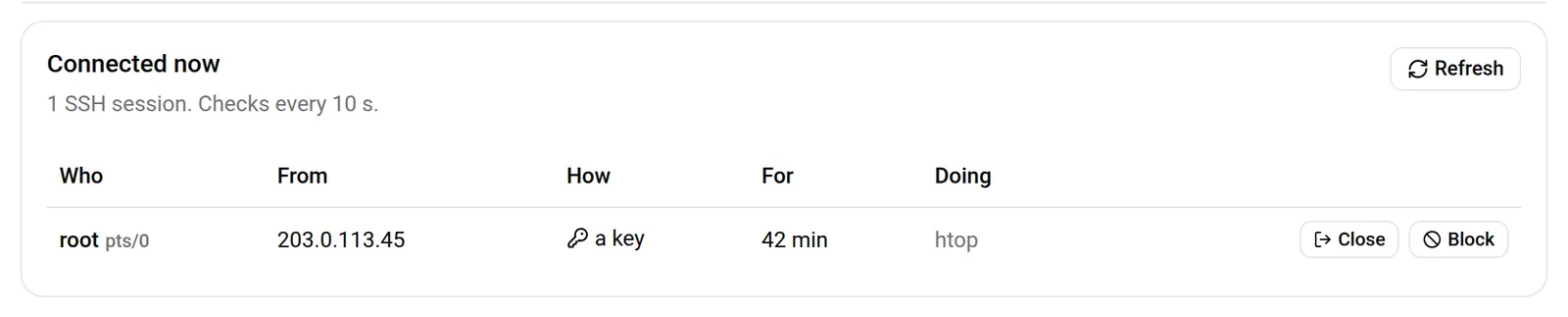
Two buttons sit on each line:
- Close ends that session.
- Block adds the address to the server's Blocked list in the firewall. You choose for how long, and whether its open sessions are closed too.
If the address is your own, the console warns you first, because you would lock yourself out.
5. Read the SSH log
SSH log shows sign-ins to the server, from the portal's terminal and from outside it, and attempts that were refused. The console reads the server's own log every 5 minutes, and Read now reads it at once. Reading writes nothing on the server.
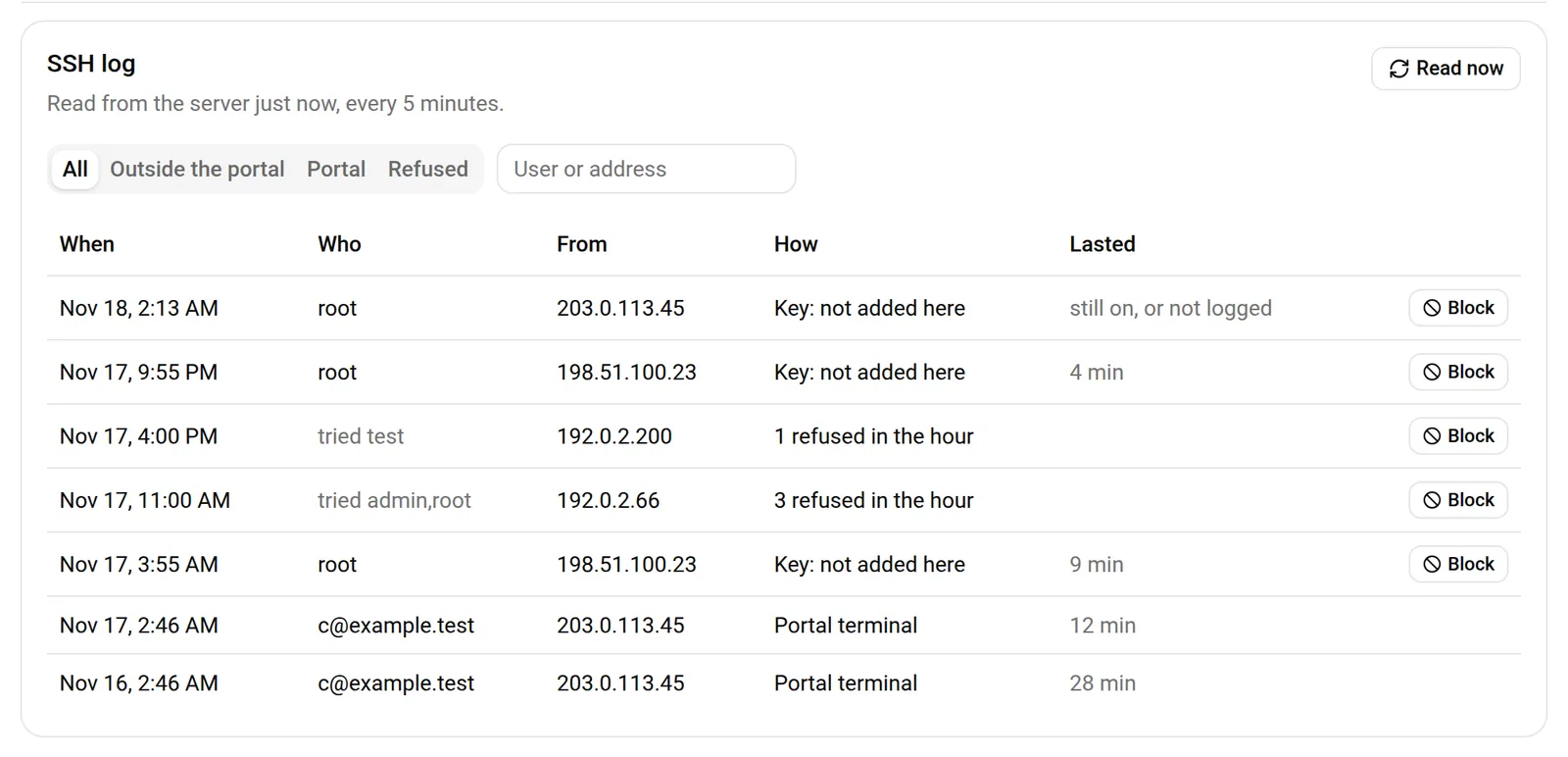
Four filters narrow the list: All, Outside the portal, Portal and Refused. Refused attempts are grouped by address and hour, so a scanner shows as one line with a count. Any line from outside the portal has a Block button.
Sign-ins are kept for 90 days and refused attempts for 30 days.
6. Manage SSH keys
SSH keys lists the keys that can sign in as root, with a label, the key type, its fingerprint and when it was last used. Add a key adds one, and Remove takes one away. When you remove a key, you can close its open sessions in the same step.
Next steps
- Allow and block addresses with the firewall.
- Securing a VICIdial server: key-only SSH and what to keep off the internet.
- Order a server. Its first week is free.
VICIdial is a trademark of its owner. Trustane is an independent hosting provider.
Sources
- The terminal screen, its sign-in form and its sessions list
- The terminal's limits, how long a session lasts and how long a recording is kept
- Connected now, the SSH log and SSH keys
- How the SSH log is read and how long it is kept
- Removing old recordings
Managed VICIdial hosting