Dial level in VICIdial: ratio, adaptive and drops
What auto_dial_level really multiplies, how RATIO and the ADAPT methods differ, and why the dial level you type is not always the one that runs.

To the point
The dial level is a multiplier. The dialer asks for auto_dial_level times the agents it counts, then places that many lines minus the calls already in flight. With RATIO the number stays where you put it. With ADAPT_* a second script, AST_VDadapt.pl, recalculates it every 15 seconds while agents are logged in.
- Agents counted: READY and DONE, plus INCALL and QUEUE unless
available_only_ratio_tallyisY. - A drop is a call the carrier reports as answered that never reached an agent.
- Fresh ViciBox 12 allows 23 lines per box. Past that, the level stops mattering.
- Do not use an adaptive method with one or two agents.
Based on AST_VDauto_dial.pl and AST_VDadapt.pl from VICIdial's SVN trunk (r4037), and the VICIdial manager manual 2.14-960a.
What the number multiplies
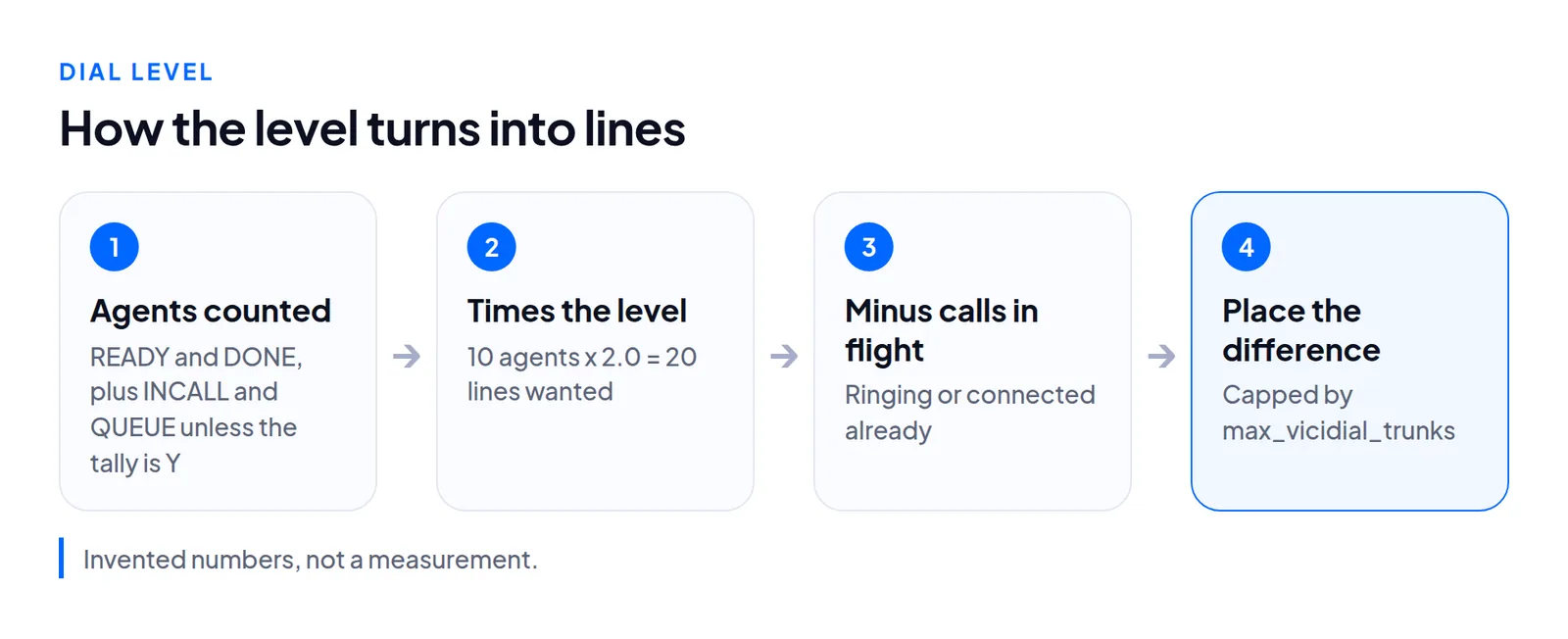
Remote agents count too, because each remote-agent line is a row in vicidial_live_agents. Take ten agents at 2.0, six on calls, four READY and nothing ringing. Default counting gives 10 agents and a goal of 20 lines: 14 new calls beside the 6 in progress. With available_only_ratio_tally=Y it counts 4: a goal of 8 plus the 6 in progress, so 8 new calls.
What counts as a drop
A drop is a call the carrier reports as answered that could not be sent to an agent before the line was hung up (manual, page 30). Adaptive methods measure today's drops over answered calls, after more than 50 calls. The fields for such a call, drop_call_seconds and drop_action, are in the abandon rate post.
RATIO: you hold the wheel
On RATIO the campaign screen offers 0 (off), then 1.0 and up to the system's auto_dial_limit. Saving a level below 1.0 raises it to 1.0. No script rewrites the level afterward, and Drop Percentage Limit does nothing on RATIO (manual, page 110).
The ADAPT methods: a script holds the wheel
These are the ones people call predictive. They differ in what they do once today's drop rate passes Drop Percentage Limit.
dial_method | What AST_VDadapt.pl does to the level |
|---|---|
ADAPT_HARD_LIMIT | Drops it to 1.0 |
ADAPT_TAPERED | Cuts it in step with the time left before adaptive_latest_server_time: no cut with 10 or more hours left, 1.0 at that time |
ADAPT_AVERAGE | Halves it |
ADAPT_PERCENTMAX | Sets it to a percentage of the maximum (default 50), if that is lower |
What they share is the loop. Every 15 seconds while agents are logged in, AST_VDadapt.pl recalculates auto_dial_level, never above adaptive_maximum_level and never below 1.0. The manual says it can take 15 to 30 seconds to react to a drastic change.
Set it up, step by step
Screens below are from the demo campaign SUNQ4 on our test server.
In VICIdial's admin
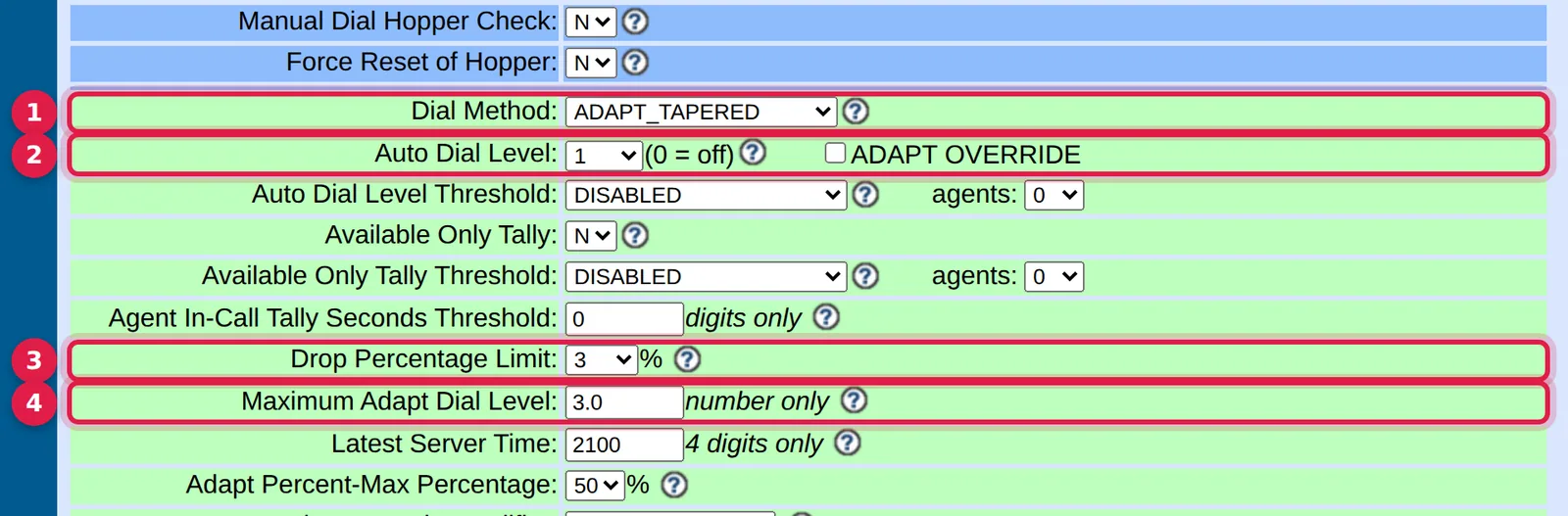
- Dial Method (
dial_method):RATIOor anADAPT_*method. - Auto Dial Level (
auto_dial_level): fixed onRATIO, the starting point otherwise. - Drop Percentage Limit (
adaptive_dropped_percentage): the drop rate to hold. The tutorial uses 3. - Maximum Adapt Dial Level (
adaptive_maximum_level): the ceiling, 3.0 in the tutorial. The manual's example: a T1 with 24 channels and 6 agents, set it to 4.0.
Also in the manual: adaptive_intensity (0 in the tutorial), adaptive_dl_diff_target (-1 aims to keep one agent free), adaptive_latest_server_time (2100 in the tutorial) and dial_level_threshold, which holds the level at 1.0 while too few agents are logged in, unpaused or waiting, on RATIO too.
In the Trustane console
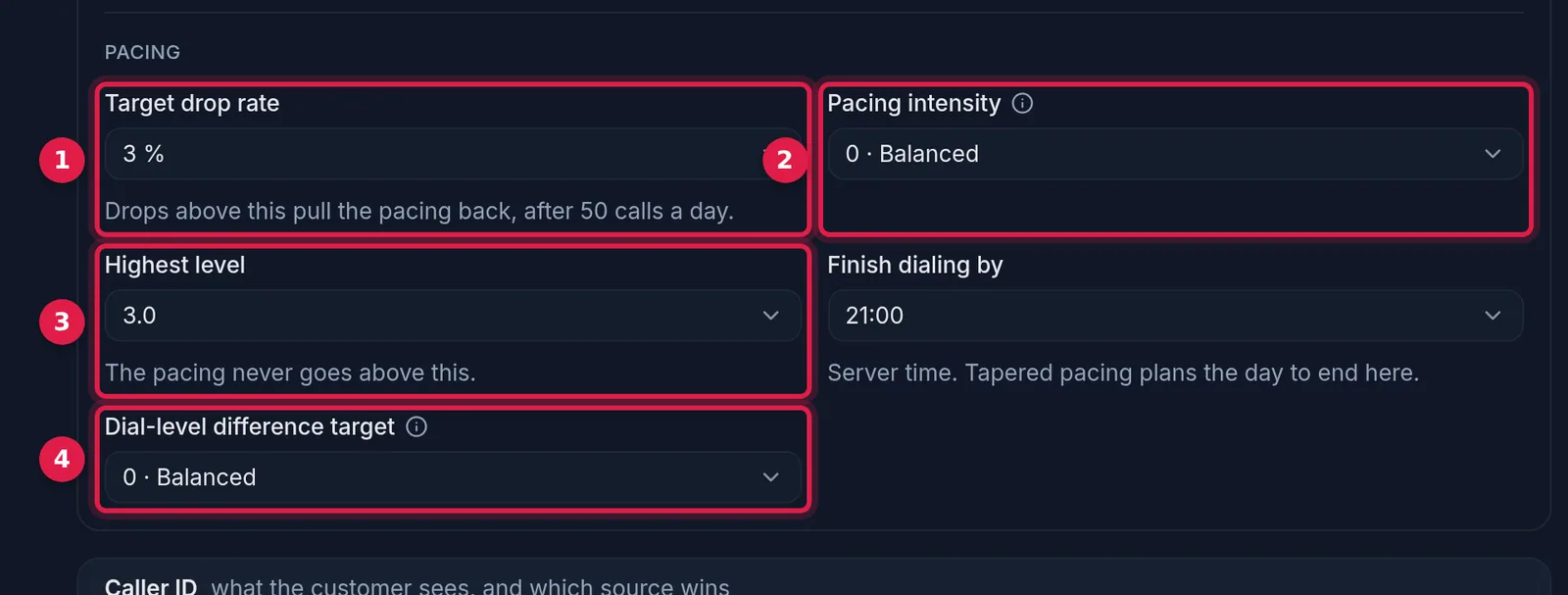
- Target drop rate: the same as Drop Percentage Limit.
- Pacing intensity: the same as Adapt Intensity Modifier.
- Highest dial pace: the ceiling, as Maximum Adapt Dial Level.
- Dial pace difference target: the same as Dial Level Difference Target.
The cap that makes every level look the same
servers.max_vicidial_trunks is the box-wide limit, 23 on a stock ViciBox 12. Twenty agents at level 3 on an otherwise idle box ask for 60 and get 23. The excess is counted as local_trunk_shortage, and the level makes no difference. AST_VDadapt.pl never reads the cap: agents left waiting push its level up to the maximum while the cap holds the real number down. See lines per agent.
How to choose
- Fewer than three agents:
RATIOat 1.0. No adaptive method. - A larger floor with a moving answer rate: an
ADAPT_*method, with the maximum set from your line limit divided by your agent count.
We did not test how any one ADAPT_* method behaves against a particular carrier's answer pattern over a full shift.
Questions people ask
Why did my dial level change by itself?
An ADAPT_* method owns it. Every 15 seconds it raises the level while agents wait and cuts it once drops pass the target.
Does auto_dial_limit cap the level?
Not in the dialer. It limits the campaign screen's choices and what the API accepts; neither dialer script reads it.
Next steps
Run SELECT campaign_id, dial_method, auto_dial_level, adaptive_maximum_level, available_only_ratio_tally FROM vicidial_campaigns WHERE active='Y'; Compare the maximum times your peak agents with max_vicidial_trunks; the smaller is the real ceiling, and other campaigns' live lines on the same box come out of the same cap. See VICIdial hosting and pricing.
VICIdial is a trademark of its owner. Trustane is an independent hosting provider.
Sources
- Trustane notes on the VICIdial 2.14 manager manual
- Trustane capacity findings, read from AST_VDauto_dial.pl and AST_VDadapt.pl
- Cover photo by James Collington on Pexels
Managed VICIdial hosting