VICIdial phones, WebRTC and templates
What a VICIdial phone record is, why the agent screen asks for one, how a conf template makes it a browser phone, and how Trustane pairs one with each agent.

To the point
In VICIdial a user and a phone are two separate records. The user is the person; the phone is the device Asterisk knows, and the agent screen asks for a phone login before the user's own. A phone's Template ID names a conf file template, and a phone set as a webphone, with a template written for WebRTC, runs in a browser. Trustane gives each agent one phone whose extension and login are the agent's own ID.
- A phone record holds an extension, a login, two passwords, a protocol, a Template ID and Set As Webphone.
- VICIdial writes each active SIP or PJSIP phone on that server into Asterisk's conf files as an entry named by its extension, with its template's contents under it when it has one.
- Trustane's Web phone: Set As Webphone Y and the server's own WebRTC template. Softphone: Set As Webphone N and no template.
- Trouble with browser phones on ViciBox 12 is a separate post: WebRTC phones on ViciBox 12.
Plays from YouTube when you press Play. Google's privacy policy applies.
Two records for one agent
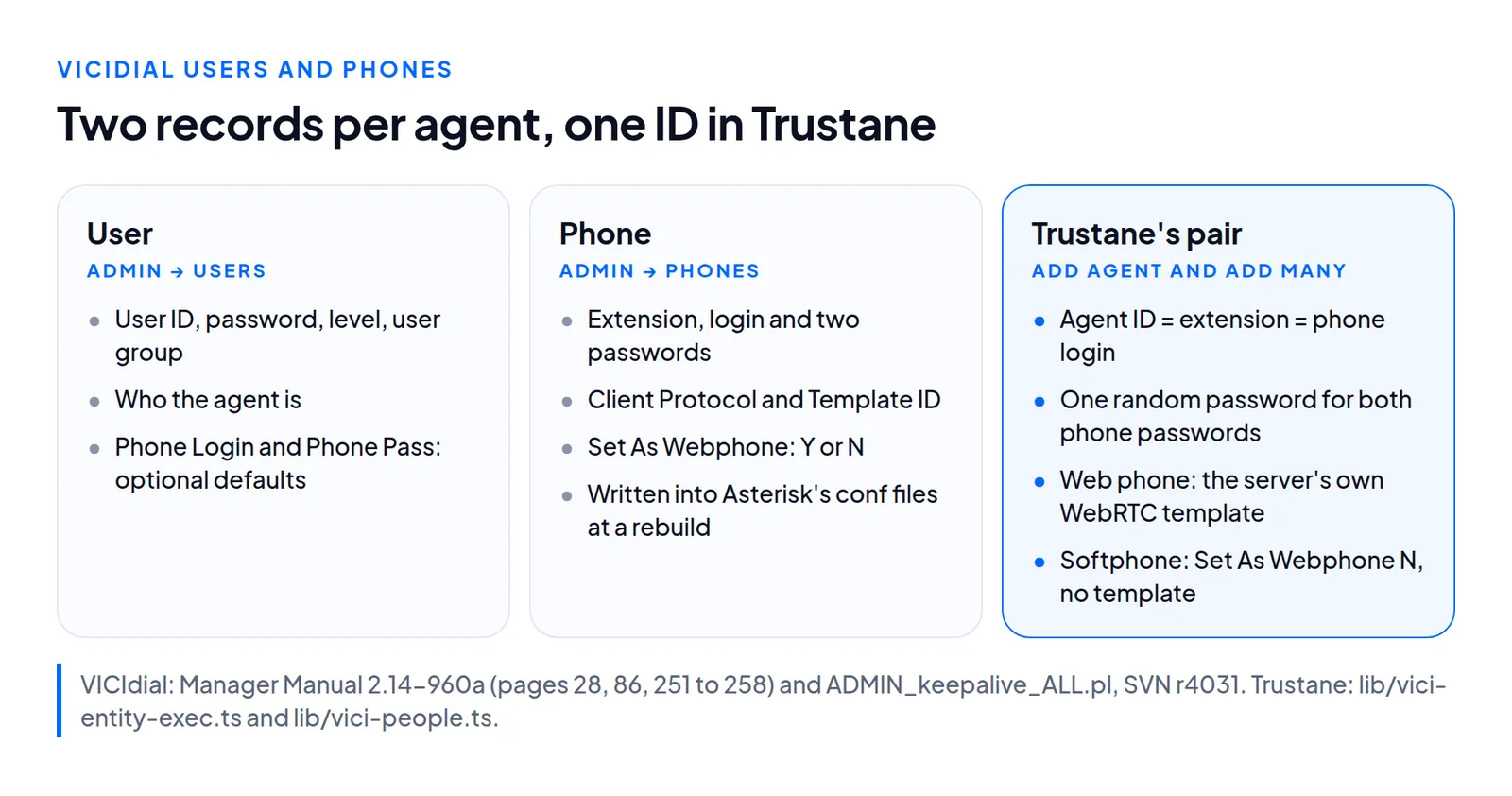
VICIdial keeps users (Admin, Users) and phones (Admin, Phones) in separate tables. A user is who the agent is: a User Number, a password, a level and a user group. A phone is a device on one server.
The manual's own tutorial logs an agent in twice over. First comes "the phone login and phone password for the phone that the agent will be using", then the username, password and campaign. After that, "your phone should ring to place you into the VICIdial session" (page 28). The agent screen's login form in VICIdial's source has the same two fields, Phone Login and Phone Password. So a user with no phone has nothing to type on the first screen.
There are ways round one phone per person. A Call-in phone entry lets agents dial in to the system, all sharing one phone login (page 258). A Phone Alias gives one login to several phones across a cluster, and the agent screen picks the server with the fewest agents logged in (page 260).
What a phone record holds
These are the fields that decide how a phone logs in and registers, as the manual describes them:
| Field | What it is |
|---|---|
| Phone extension | The phone's name as Asterisk sees it, without the protocol: SIP/test101 is test101 (page 251) |
| Agent Screen Login | The login the agent types on the agent screen (page 252) |
| Login Password | That login's password, for the agent screen only (page 252) |
| Registration Password | The secret the phone registers with, in the generated conf file (page 253) |
| Set As Webphone | Y loads a web-based phone when the agent logs into the agent screen (page 253) |
| Client Protocol | SIP, PJSIP, IAX2, Zap, or EXTERNAL for remote or speed dial numbers (page 254) |
| Template ID | The conf file template for the phone's Asterisk settings; default --NONE-- (page 258) |
The two passwords are easy to mix up, and the manual says so: a SIP or IAX phone registers with the Registration Password, not the Login Password (page 251).
The user record has phone fields of its own, Phone Login and Phone Pass. They are optional defaults that fill in the phone login when the user logs in with user, password and campaign, and the manual notes that the web server's user_login_first option must be on for that (pages 86 and 87).
In VICIdial's table definitions a user's ID can be 20 characters, while a phone's login column holds 15.
How a phone reaches Asterisk
Saving a phone writes a database row; Asterisk reads conf files. Each server has a flag that asks for a rebuild. When the flag is Y on a server that generates its own conf files, VICIdial's keepalive script rebuilds them and sets the flag back to N.
For each active SIP phone on the server, the rebuild writes an entry named by the phone's extension, with the extension as the username and the Registration Password as the secret. A PJSIP phone gets the same in the PJSIP wizard file, as inbound_auth/username and inbound_auth/password. What comes next depends on the template:
- A Template ID: the template's contents go under those lines.
- Conf Override Settings filled in: those settings are written into the phone's entry, under the template's lines when a template is set too (page 258).
- --NONE-- and nothing else: a short default entry. For a SIP phone that is
type=friendandhost=dynamic, plus the context, caller ID and mailbox.
A conf file template is a record of its own: an ID of 2 to 15 characters, a name, and the contents shared by every phone or carrier that uses it, to keep the same settings across many entries. The manual says those contents should leave out secret, accountcode, account, username and mailbox (page 273). The rebuild writes the username, secret, account code and mailbox from each phone record itself, so one template can serve every agent.
What makes a phone a web phone
A web phone is still an ordinary phone record. Three things change:
- Set As Webphone is Y, so the agent screen loads a phone in the browser at login (page 253).
- The template is written for WebRTC. The manual's list for a WebRTC phone is Asterisk 13 or newer, authentic SSL certificates for every Asterisk server and web server agents log into, and a conf file template on each phone meant to work that way (page 463).
- The server has a Web Socket URL, the address a WebRTC phone connects to (page 272).
A softphone needs none of those. It is a SIP app on the agent's computer that registers with the extension and the Registration Password, and VICIdial rings it when the agent logs in (page 28). Which template a ViciBox 12 server ships, and which SIP stack its browser phones live in, are covered in the ViciBox 12 WebRTC traps. The audio budget either way is in bandwidth per agent.
How Trustane pairs a phone with each agent
When Trustane creates an agent, from Add agent or from Add many, it writes the user and then one phone:
- One ID. The phone's extension, dial plan number, voicemail box and login are all the agent's ID. In the console, agent 1001 has phone 1001, which is why our agent IDs stop at 15 characters.
- One password. A random 12-character password is both the phone's Login Password and its Registration Password, and it is copied into the user's Phone Login and Phone Pass fields.
- Web phone: Set As Webphone Y, dial pad and auto-answer on, and the server's own WebRTC template:
vicibox-RTCwhere the server has it, otherwise the first template with RTC in its name. - Softphone: Set As Webphone N and Template ID
--NONE--. - The protocol follows the server: PJSIP when the System Settings' Allowed SIP Stacks is PJSIP or the server runs Asterisk 21 or newer, SIP otherwise. Why Asterisk 21 matters: moving from chan_sip to PJSIP.
- All or nothing. If the phone cannot be written, or its login is not stored exactly, the user is taken back out.
Each person's sheet shows the pair:
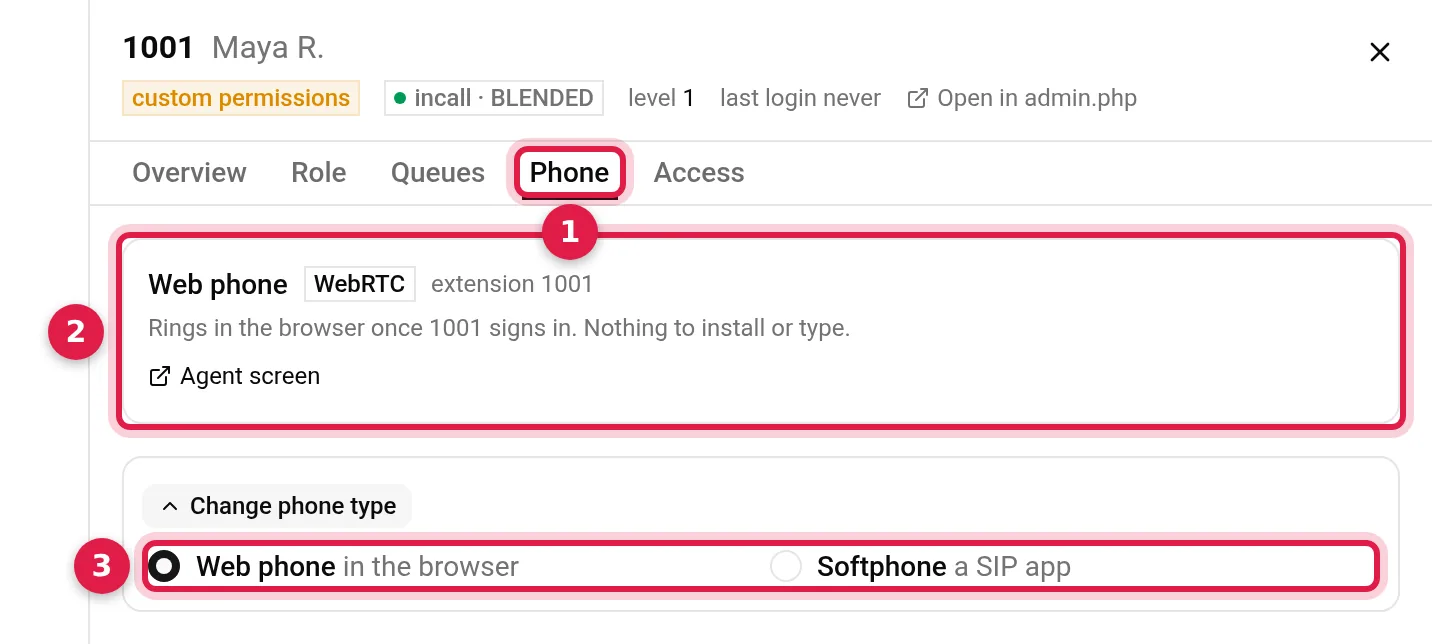
- Phone: the tab in the person's sheet, opened from the Users list.
- Web phone: its template (WebRTC on our demo server), its extension, which is the agent's ID, and "Rings in the browser once 1001 signs in. Nothing to install or type."
- Change phone type: Web phone or Softphone. It changes this phone in place, and the agent logs in again afterwards.
A softphone shows a card instead, with the server, port, username and password to type into a SIP app; its username and auth ID are both the extension. Switching to a web phone checks the template against the phone's stack: a chan_sip phone needs a chan_sip template, and a PJSIP phone a PJSIP one. A user made elsewhere, with no phone, shows "No phone is linked." and an Add phone button, and the Users list offers Add phones for everyone without one. Add phone uses the user's ID as the extension.
Questions people ask
Does every VICIdial agent need a phone record?
To log in at the agent screen, yes: its first step asks for a phone login. Agents who dial in can share one Call-in phone entry (manual, page 258).
What is the difference between a web phone and a softphone?
A web phone runs in the agent's browser: Set As Webphone is Y and the phone uses a WebRTC template. A softphone is a SIP app on the computer, registered with the extension and the Registration Password; in Trustane it has no template.
Why are Trustane agent IDs at most 15 characters?
Each agent's ID is also its phone's login, and VICIdial's phones table keeps 15 characters for a login.
Next steps
To create agents with their phones, see Add up to 100 VICIdial agents in one go. For servers, see VICIdial hosting and pricing.
VICIdial is a trademark of its owner.
Sources
- VICIdial Manager Manual 2.14-960a, phones, users, conf file templates and WebRTC
- VICIdial SVN r4031, the conf file rebuild ADMIN_keepalive_ALL.pl
- VICIdial SVN r4037, the phones and users tables
- VICIdial SVN r4037, the agent screen's login form
- Trustane console, the phone each new agent gets
- Trustane console, phone type, Add phone and the web phone template
- Trustane console, a person's Phone tab
Managed VICIdial hosting