Find what happened to any VICIdial call, step by step
Open one VICIdial call in Trustane and see who called, each step with its time, every transfer between agents, who hung up and the recordings.

To the point
In the Trustane console, Results, then Calls, lists every call on a VICIdial server. Click one and it opens in a sheet that reads the logs VICIdial keeps for that call.
- The call: who called, the line they called, the carrier, the wait in queue and the talk time.
- How it went: each step with its time, each transfer to another agent or queue, who hung up and each agent's disposition.
- Recordings: the recordings VICIdial made of the call, played in a bar docked at the bottom of the console.
- What VICIdial logged: the rows behind the steps, table by table, for when you need the raw data.
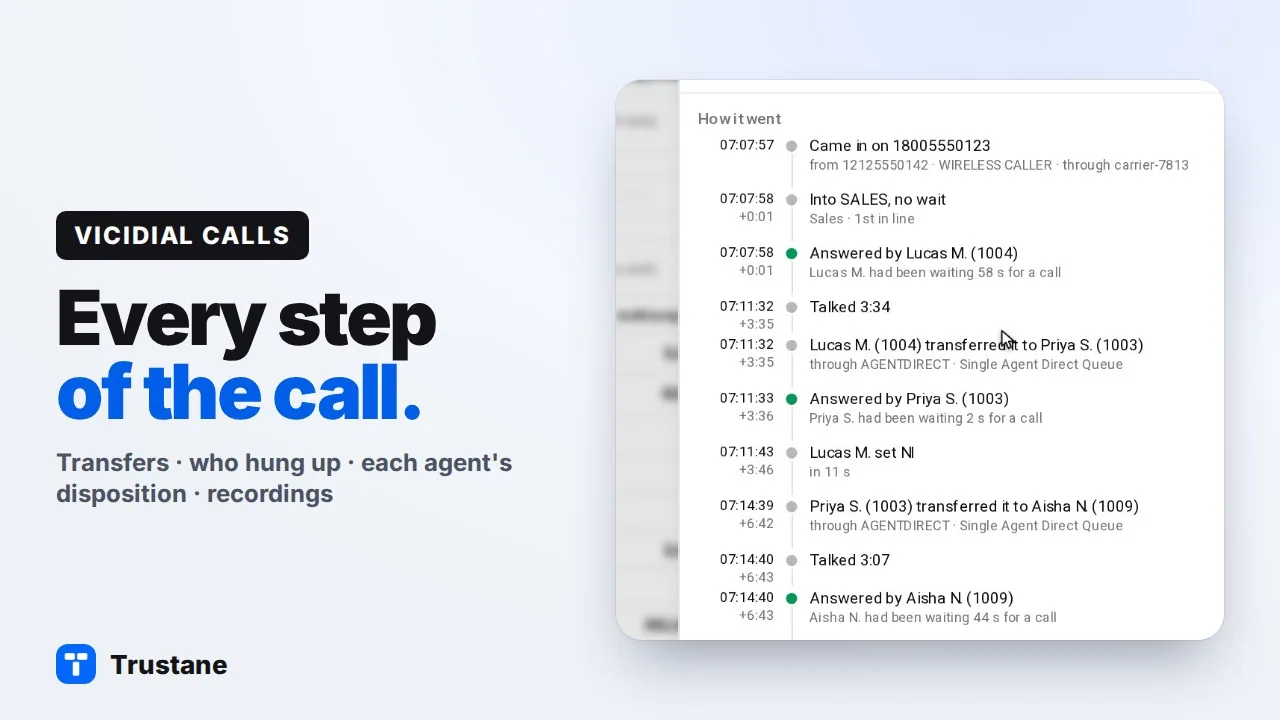
Plays from YouTube when you press Play. Google's privacy policy applies.
The pictures come from our demo account. The numbers are fictional 555 numbers and the agents are made up.
Open the call
- Open Results, then Calls.
- Pick the dates: Today, Yesterday, This week, Last 7 days, This month or your own range. Narrow it by campaign or queue, agent, disposition or list if you need to.
- Click the call's row.
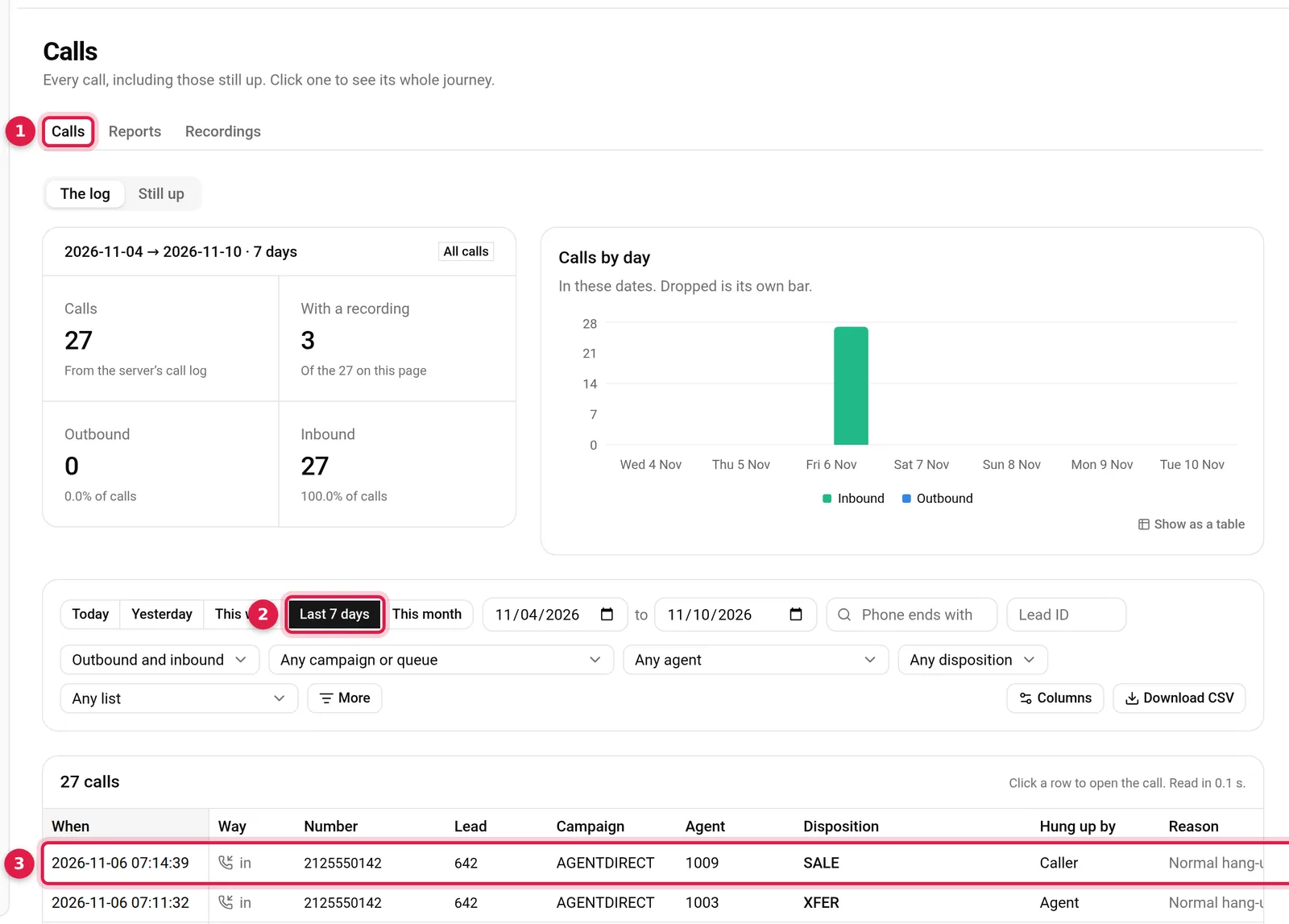
A transferred call shows one row per leg in the log, and every one of them opens the same call. The same sheet also opens from other places in the console:
- Still up, the calls that are on the line now;
- a lead's call history;
- the Floor, from an agent who is on a call;
- a link someone copied from the sheet.
While a call is still up, the sheet reads it again every 5 seconds.
The call at a glance
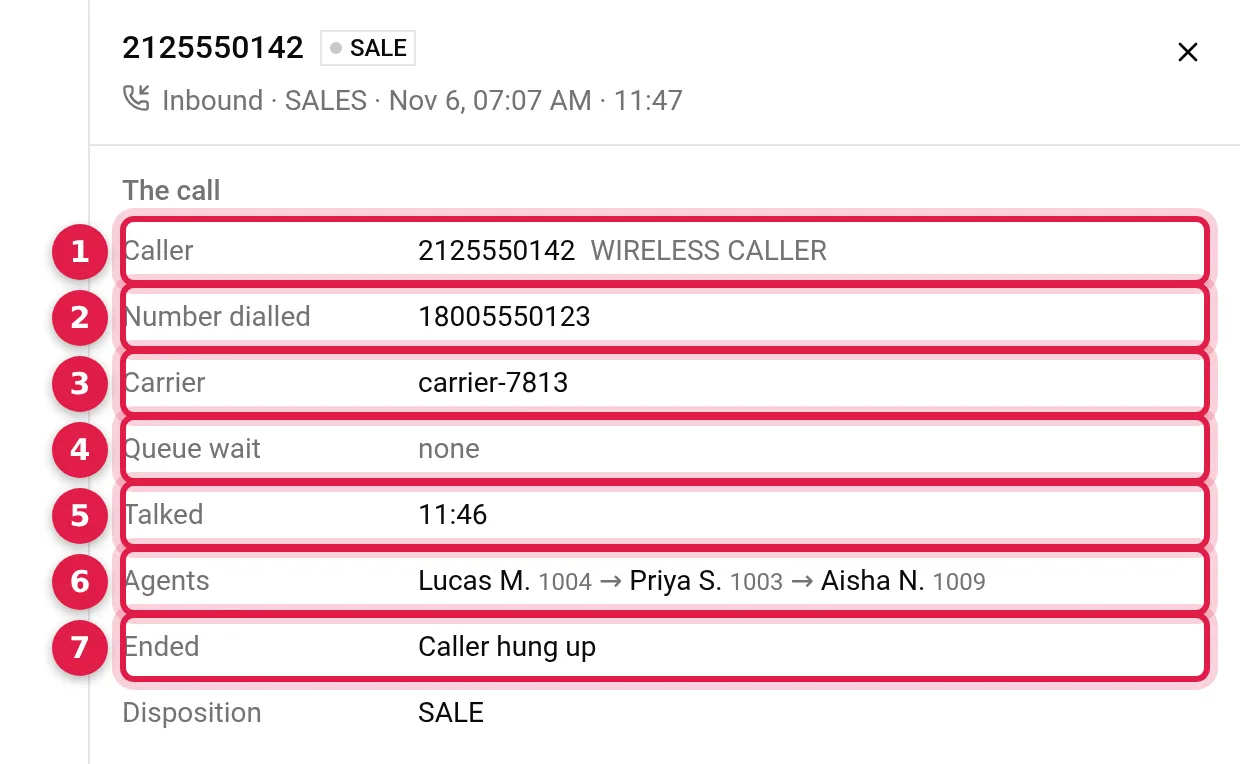
The top of the sheet answers the first questions:
- Caller: the caller ID number and name VICIdial received.
- Number dialled: the line they called. This is the inbound DID's description, so a DID described "Sales line" shows those words instead of the digits.
- Carrier: the trunk the call came in on, read from the call's channel name.
- Queue wait: how long the caller waited before an agent took the call.
- Talked: the agents' talk time.
- Agents: everyone who had the call, in order.
- Ended: who hung up, and the disposition below it.
For an outbound call the sheet shows Called and the Caller ID sent, and says so when none was set.
How it went
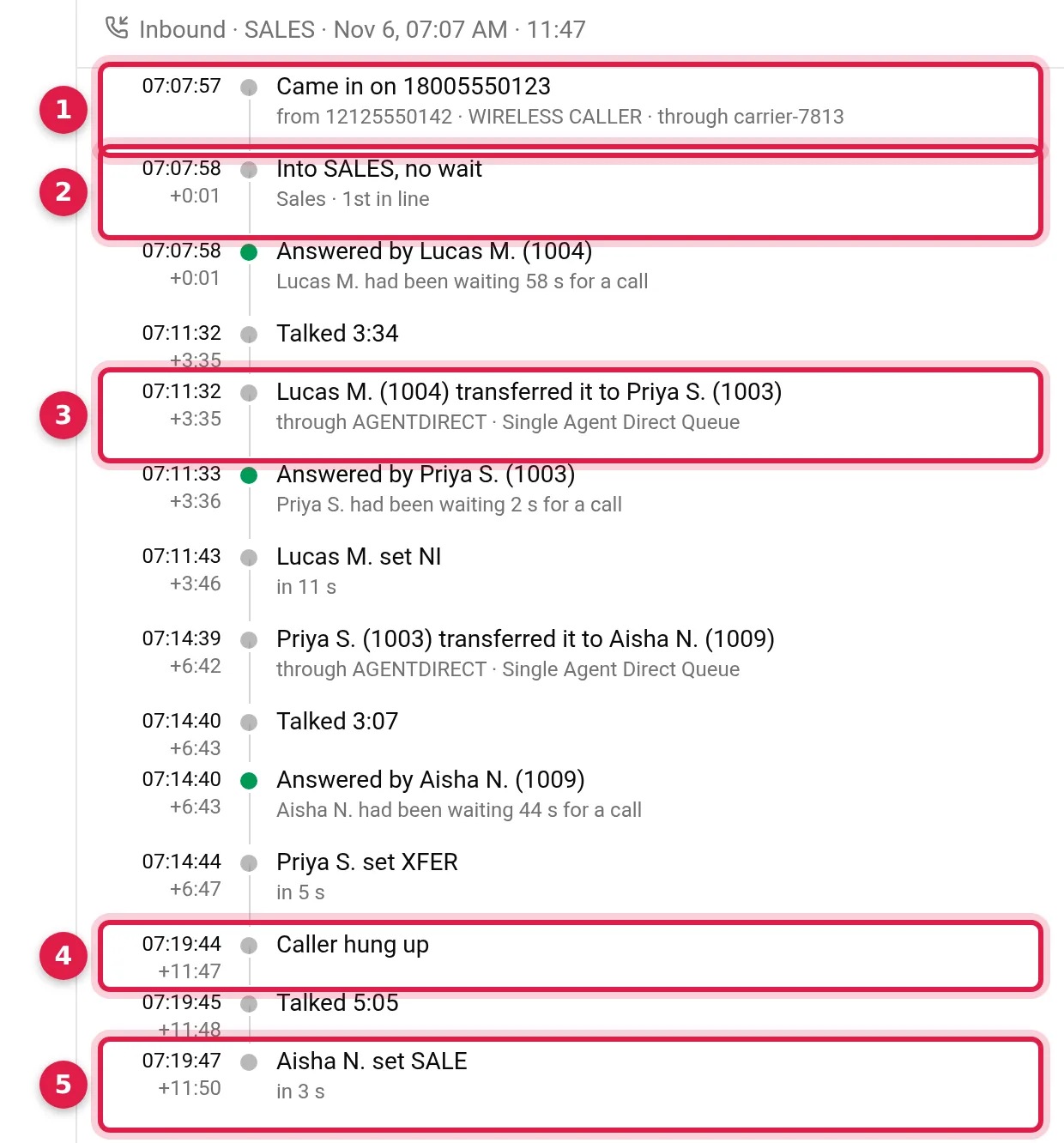
How it went lists every step with the server's clock time on the left and the time since the call began under it. For the call above:
- It came in on the DID, with the caller's number and the carrier.
- It went into SALES with no wait, first in line.
- Lucas M. answered and talked 3:34, then transferred it to Priya S. through AGENTDIRECT, VICIdial's queue for a call sent straight to one agent. Priya transferred it to Aisha N. the same way.
- The caller hung up after 11:47.
- Each agent's disposition appears when they set it: Lucas set NI, Priya XFER, Aisha SALE.
Other calls show other steps when VICIdial logged them: keys pressed in a call menu, a DID route that sent the call somewhere other than a queue, a caller who gave up while waiting, the carrier's answer and the answering-machine result on an outbound call, or an agent's screen that stopped reporting for a while.
When VICIdial logged agent latency for the call, an Agent latency section shows each agent's average and peak, in amber when the average is over 500 ms or the screen had gaps.
Play the recordings
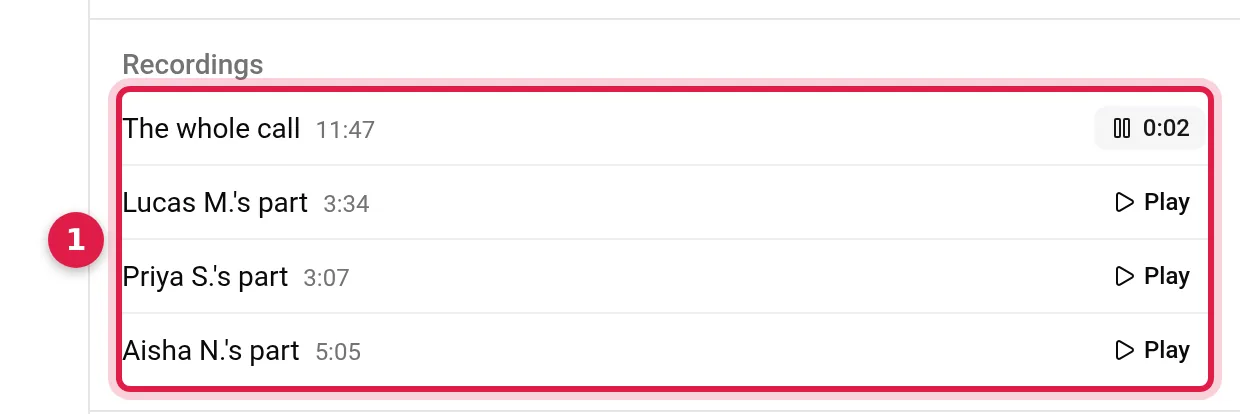
Recordings lists the recordings VICIdial made of the call, up to ten. For this call there is the whole call and each agent's part. What you get depends on your settings: the DID's Record Call records the whole call and is off by default. Each agent's part follows the campaign's Campaign Recording, which an in-group's In-Group Recording Override can replace for its calls. By default it records only when the agent presses record; ALLCALLS or ALLFORCE record every call.
Press Play and a player docks at the bottom of the console. It keeps playing while you scroll, close the sheet or open another page.

- Back and forward 10 seconds. On the keyboard, Space plays and pauses and the arrow keys skip 5 seconds.
- Position: drag to any point.
- Speed: 1×, 1.25×, 1.5× or 2×, remembered in this browser.
- Download the file.
- Copy a link at this moment: the link opens this recording at the second you copied it.
- Open call goes back to the call the recording belongs to.
The links open in the console, so whoever opens one signs in first.
What VICIdial logged
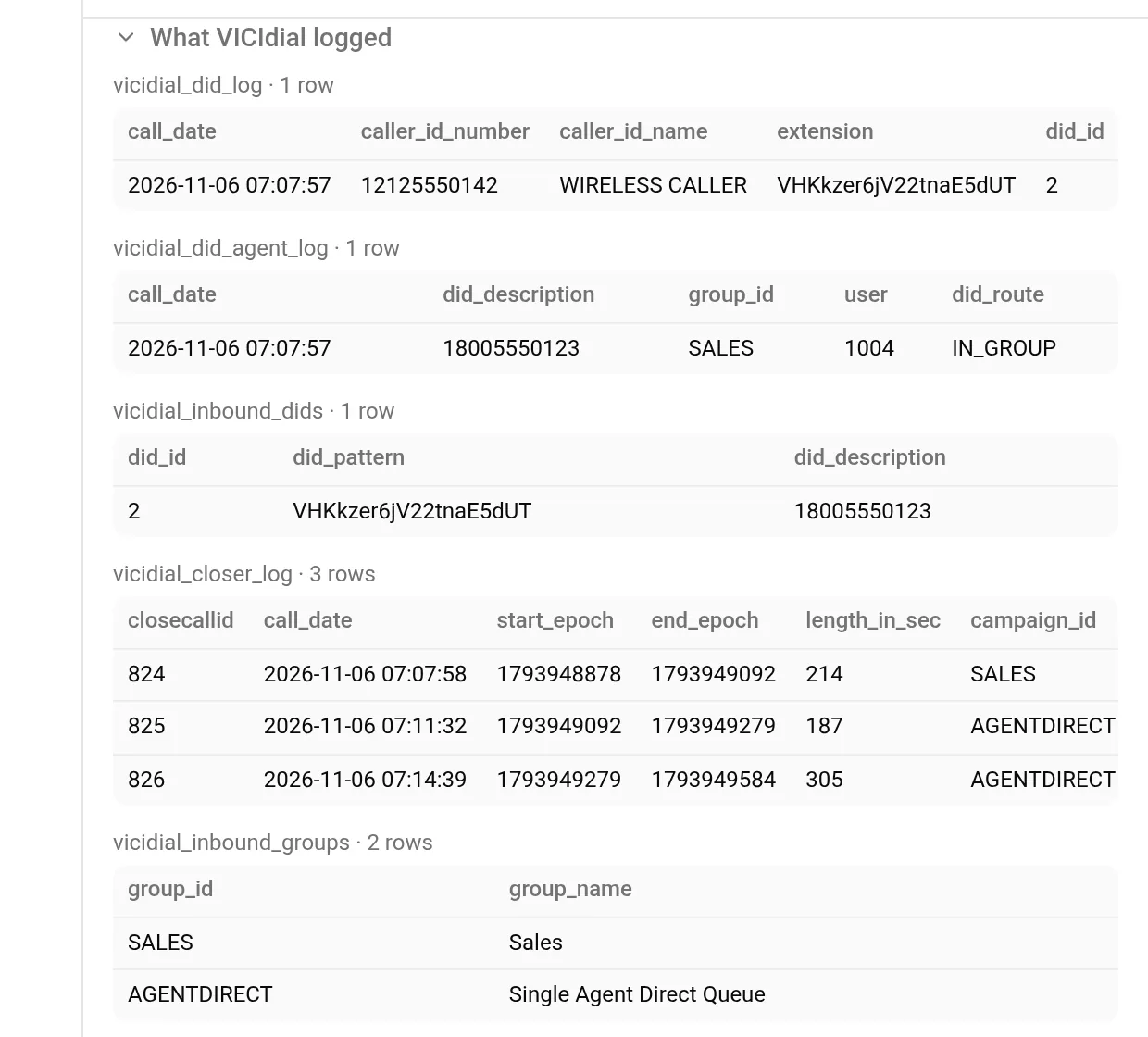
At the bottom of the sheet, What VICIdial logged opens every row read for this call, table by table, with the row count beside each table name. This is the place to check a step against VICIdial's own data, or to copy a value for a report. Reading VICIdial call logs without SQL explains what each table holds.
Share the call
Copy link at the foot of the sheet copies a link to this call. Anyone on your account can open the same call with it.
Questions people ask
Why does one call show as several rows in the log?
A transferred inbound call has one closer log row per leg in VICIdial. The log shows each leg, and each opens the same call.
Why is a recording missing?
The sheet lists what VICIdial recorded. If the DID's Record Call is off, there is no whole-call recording, and with Campaign Recording on ONDEMAND an agent's part exists only if they pressed record.
Can I see a call that is still going on?
Yes. Open Still up, or the agent on the Floor. The sheet reads the call again every 5 seconds until it ends.
Next steps
- Reading VICIdial call logs without SQL: which table holds which part of a call.
- Which carrier carried that call? and how in-groups pick the next agent.
- Recording storage per agent, or order a server and open your own calls.
VICIdial is a trademark of its owner. Trustane is an independent hosting provider.
Sources
- Trustane console, the call sheet
- Trustane console, how the steps are worded
- Trustane console, what is read from VICIdial for one call
- Trustane console, the docked recording player
- VICIdial SVN r4037, the log tables
Managed VICIdial hosting