Reading VICIdial call logs without SQL
Which VICIdial table holds which part of a call, what one transferred inbound call leaves behind, and where to read it all without writing SQL.

To the point
VICIdial does not keep one record per call. It writes each part of a call to its own log table, and the call's uniqueid ties the rows together.
- Inbound: the DID log, a closer log row for each queue leg, an agent log row for each agent, a transfer log row for each hand-over and the recording log.
- Outbound: the outbound call log, the dial log, the carrier log and the answering-machine log.
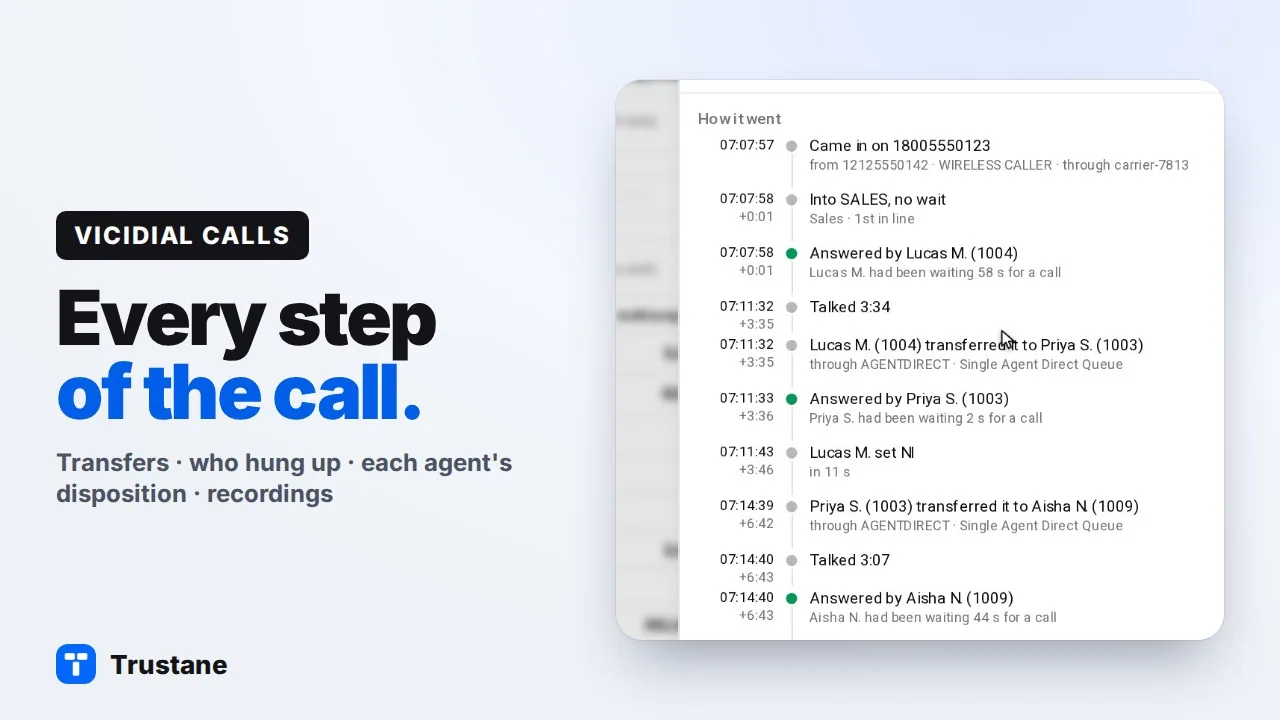
- Without SQL: VICIdial's lead page shows most of these for one lead. The transfer log and the carrier log are not on it. Trustane's call sheet reads them all for one call.
Plays from YouTube when you press Play. Google's privacy policy applies.
One call, many tables
Every call in VICIdial gets a uniqueid, and VICIdial writes that id into most of the log rows the call produces. We read five calls on a VICIdial 2.14 server on 2026-10-26: a plain inbound call, a call transferred twice, an abandoned call, a queue timeout and a manual outbound dial. A transferred inbound call kept one uniqueid from start to end, with a row in each table below for each part.
| Table | What it holds | A row for each |
|---|---|---|
vicidial_did_log | The DID called, the caller ID number and name, the route, the channel it came in on | Call that arrives on a DID |
vicidial_closer_log | The in-group, the queue wait and place in line, the agent, the status, the length and who ended it (term_reason) | Queue leg |
vicidial_agent_log | The agent's wait, talk, disposition and dead seconds, and the status they set | Agent who had the call |
vicidial_xfer_log | Who passed the call to whom, through which in-group | Transfer to an agent or a queue |
recording_log | The file, its length and whose it is | Recording |
vicidial_log | The campaign, the agent, the status, the length and who ended it | Outbound call |
vicidial_dial_log | The number sent with its dial prefix, the channel, the caller ID sent and the SIP hang-up cause | Dial attempt |
vicidial_carrier_log | The carrier's answer: dial status, hang-up cause and SIP cause | Carrier attempt |
vicidial_amd_log | The answering-machine result | Answering-machine check |
What a transferred call leaves behind
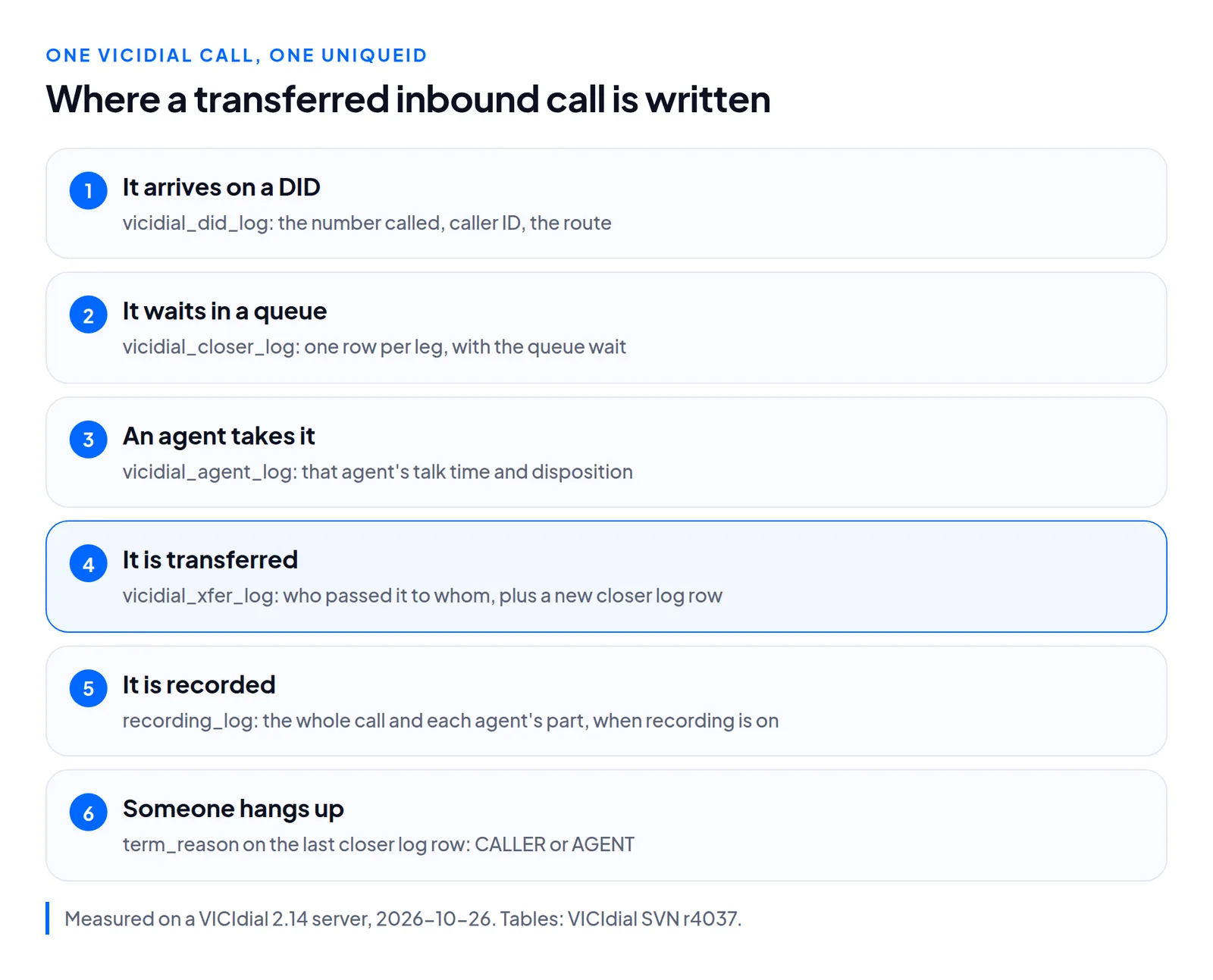
Take one inbound call that an agent transferred to a second agent, who transferred it to a third. It leaves:
- 1 row in
vicidial_did_log, when it arrived on the DID; - 3 rows in
vicidial_closer_log, one per leg: the first queue, thenAGENTDIRECTtwice, VICIdial's queue for a call sent straight to one agent; - 2 rows in
vicidial_xfer_log, one per hand-over; - 3 rows in
vicidial_agent_log, one per agent, each with that agent's own disposition; - the recordings in
recording_log, when recording is on: the whole call under the DID's extension, and each agent's part.
So the call's talk time is in the agent log, per agent, and who hung up is on the last closer log row.
A call nobody answered
When the caller gives up or the queue's time runs out, the closer log row belongs to the user VDCL, which VICIdial creates as "Inbound No Agent". Its term_reason says which: ABANDON when the caller gave up, QUEUETIMEOUT when the queue's time ran out.
Who ended the call
term_reason on the closer log has 12 values in VICIdial's table. Four of them:
term_reason | Means |
|---|---|
CALLER | The caller hung up |
AGENT | The agent hung up |
ABANDON | The caller gave up while waiting |
QUEUETIMEOUT | The queue's time ran out |
The others include AFTERHOURS, NOAGENT and MAXCALLS. NONE is the default until VICIdial writes another.
Read it in VICIdial without SQL
VICIdial's own lead page, Modify Lead (admin_modify_lead.php), lists for one lead:
- Calls to this lead: the outbound log;
- Closer records for this lead: every queue leg;
- Agent log records for this lead;
- IVR logs for this lead;
- Recordings for this lead.
That covers most of a call. Two parts are not on the lead page: the transfer log and the carrier log. Its CALLER ID link adds the dial log's caller ID and SIP cause, the answering-machine result and the DID to each call. For the carrier and the dial, VICIdial has the Carrier Log Report and the Dial Log Report under Reports, then Admin Utilities (level 9 users). The carrier log is only written when the server's Carrier Logging Active is on, which is its default.
The lead page is organised by table and by lead, not by call. A lead called three times shows the rows of all three calls, and you match them yourself by time.
Read it in Trustane
Trustane's call sheet reads all nine tables in the table above for one call, by its uniqueid. It puts the rows in order as steps, and keeps the raw rows under What VICIdial logged. Find what happened to any VICIdial call walks through it.
Questions people ask
Why does a transferred call have three closer log rows?
One per leg. Each agent who took the call through a queue, including AGENTDIRECT, adds a row.
Where is the talk time?
Per agent, in vicidial_agent_log (talk_sec). The closer log's length runs from the start of the leg, so it includes the queue wait.
Why is the carrier log empty?
Check the server's Carrier Logging Active. It is a per-server setting, on by default, and with it off the carrier log stays empty.
Next steps
- Find what happened to any VICIdial call, step by step in Trustane.
- Which carrier carried that call?: the call log against the carrier log.
- VICIdial's abandon rate, measured and the real-time report, explained.
VICIdial is a trademark of its owner. Trustane is an independent hosting provider.
Sources
- VICIdial SVN r4037, the log tables and their columns
- VICIdial SVN r4006, the lead page (Modify Lead)
- VICIdial SVN r4031, the reports list (Carrier Log Report, Dial Log Report)
- VICIdial SVN r4037, the transfer log row an agent's transfer writes
- VICIdial SVN r4006, a blind transfer logged to user_call_log
- Trustane, five calls measured on a VICIdial 2.14 server, 2026-10-26
- Trustane console, the call sheet
Managed VICIdial hosting