A VICIdial glossary: hopper, dial level, trunks, lagged, AMD
Plain definitions of the VICIdial terms that come up in every support ticket, with the table or field name for each and a link to the longer post.

To the point
These are the VICIdial terms we explain most often, each with the field or table name as typed and a link to the longer post. We read VICIdial 2.14 on a ViciBox 12 server.
- Start with the hopper and the trunk limit when a campaign misbehaves.
- A drop needs a person on the line. A no-answer does not.
max_vicidial_trunksis enforced by the dialer.auto_dial_limitis not.call_log, notvicidial_carrier_log, names the carrier.
Where these fields live
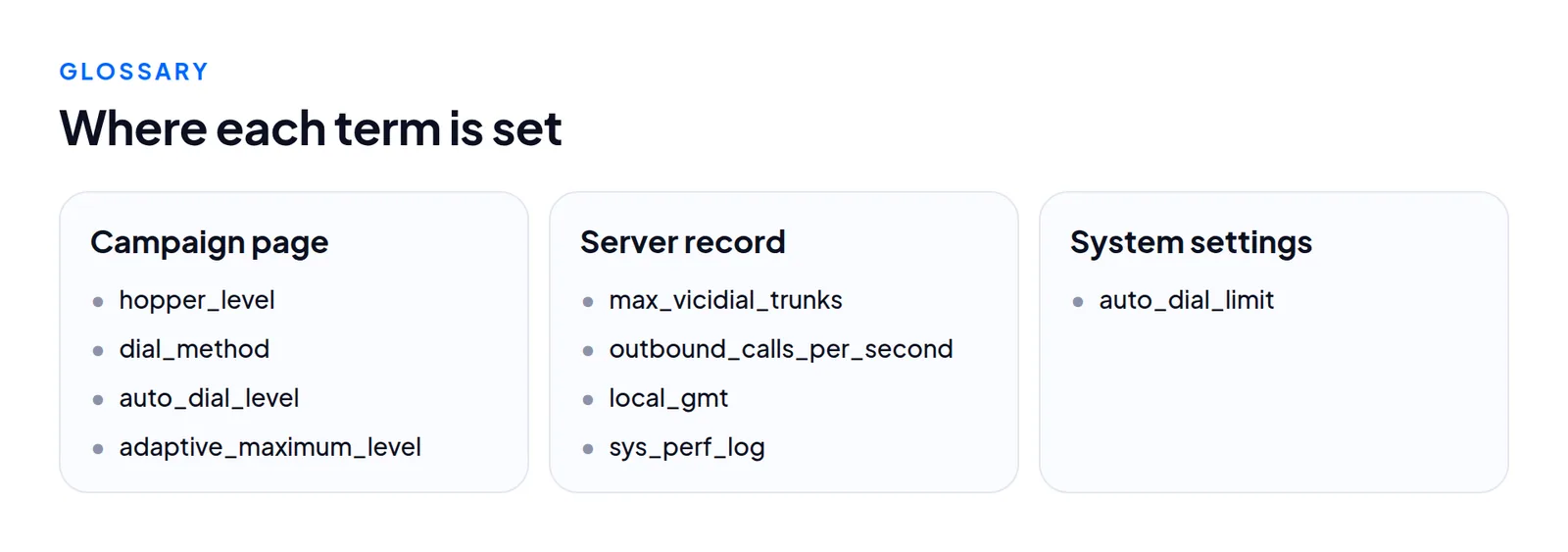
On our test server, campaign Sunline Solar Q4 callbacks (SUNQ4). Markers map to the numbered list below each picture.
In VICIdial's admin
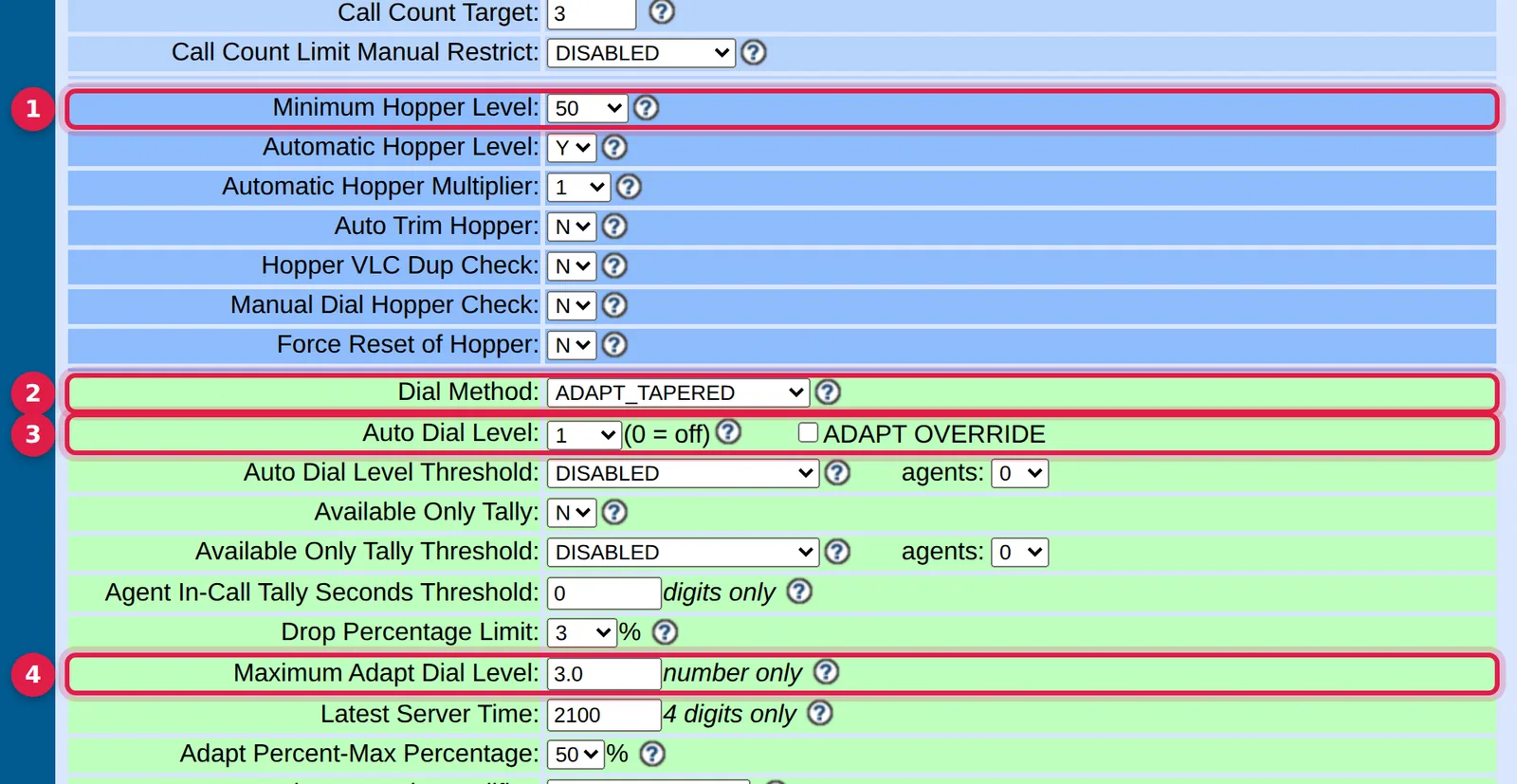
- Minimum Hopper Level: how full the hopper tries to stay (
hopper_level). - Dial Method: who sets the pace (
dial_method). - Auto Dial Level: lines per agent counted (
auto_dial_level). - Maximum Adapt Dial Level: the ceiling for adaptive methods (
adaptive_maximum_level).
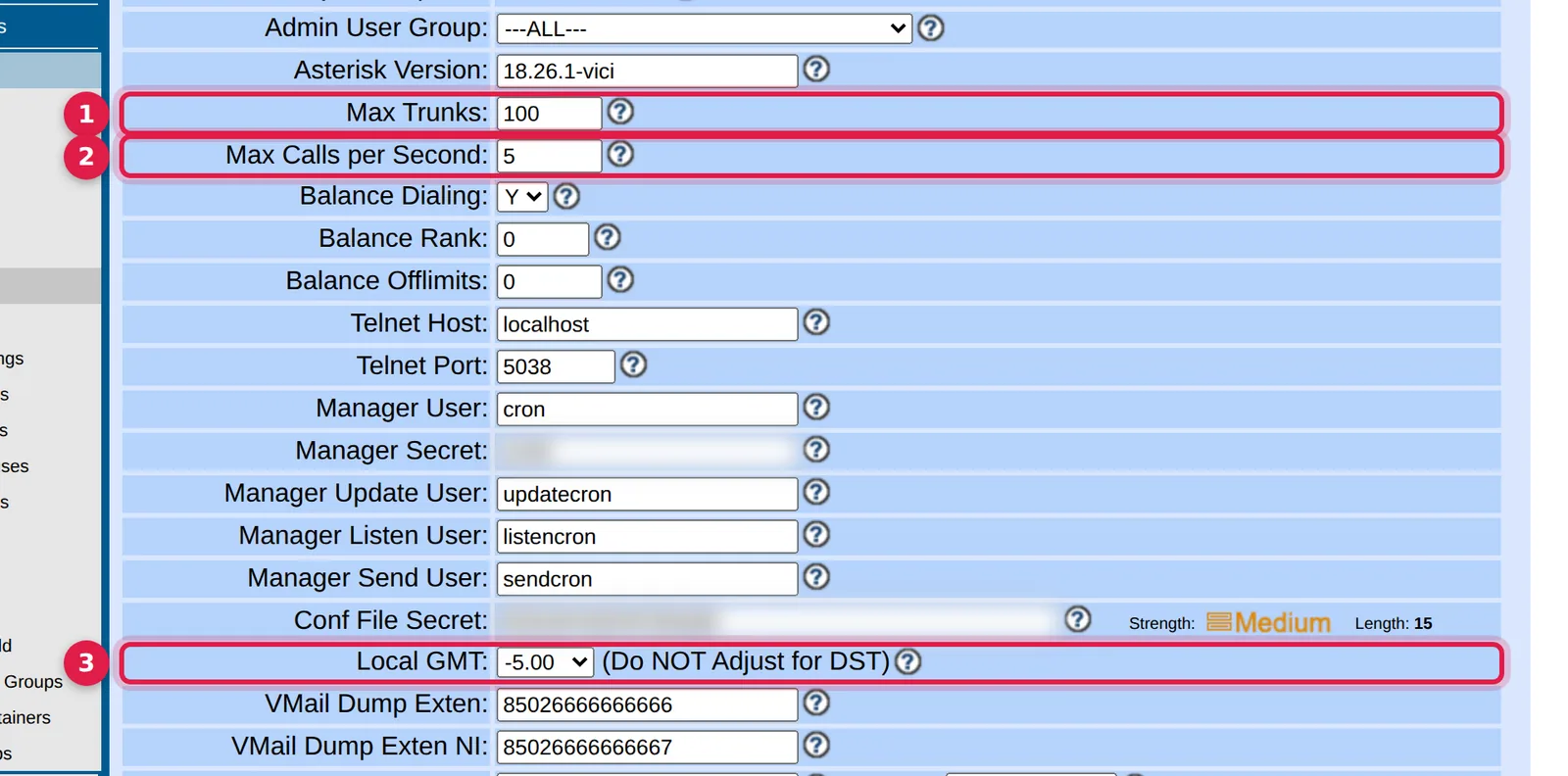
- Max Trunks:
max_vicidial_trunks, the box-wide line limit. - Max Calls per Second: how quickly new calls start.
- Local GMT: the offset the hopper uses for local time.
Dialing
- Hopper. The table
vicidial_hopper, holding the next leads per campaign. The dialer takes leads only from it. A script refills it about once a minute. An empty hopper is the first thing to check when nothing dials. See reading the hopper. - Dial method.
dial_method:MANUAL,RATIO, theADAPT_*family,INBOUND_MANand theSHARED_*variants. See what a predictive dialer does. - Dial level.
auto_dial_level, the lines aimed at per agent counted. Level 2.0 with ten agents is a goal of 20.AST_VDadapt.plmoves it, up toadaptive_maximum_level. Plan lines from that ceiling, not today's value. See the dial level post. - Drop. A call answered by a person when no agent is free. After
drop_call_seconds,drop_actiondecides what they hear. The target isadaptive_dropped_percentage. The legal limit for your calls is yours to check. See the abandon rate. - Available only tally.
available_only_ratio_tally. OnYthe dialer counts only READY agents. OnNit counts READY and INCALL. - Call time. A named window such as
9am-9pmset bylocal_call_time. The hopper tests each lead's local clock against it. - Lead filter. Saved SQL (
lead_filter_id) added to the hopper's selection.NONEmeans none. - Dial statuses.
dial_statuses, the lead statuses the hopper may pick, such asNEW. - Local GMT.
servers.local_gmt, such as -5.00. The hopper uses it, not the operating system, for local time. See time zones and clock skew.
Capacity and lines
- Trunk. One outbound line. The box limit is
servers.max_vicidial_trunks, 23 on a stock ViciBox 12. The excess is counted aslocal_trunk_shortage, shown as "trunk short" on the real-time screen. See lines per agent. - Reserved trunks. Rows in
vicidial_server_trunksthat set lines aside for a campaign (OVERFLOW_ALLOWED) or cap it (MAXIMUM_LIMIT). - Outbound calls per second.
servers.outbound_calls_per_second, 1 to 200. - Auto dial limit.
system_settings.auto_dial_limit, the top choice in the admin dial level menu. The dialer scripts do not read it. - sys_perf_log. The flag that records load and channel counts in
server_performance. Off by default. See watching capacity when it is off.
Agents
- Live agents.
vicidial_live_agents, one row per logged-in agent. - READY, INCALL, PAUSED. Waiting, on a call, not taking calls.
- Lagged. No check-in from the agent's browser for 30 seconds. It usually reflects the network between agent and server. See lagged agents.
- Remote agent. A fake agent line, such as for a broadcast. It counts toward the line goal like a person.
- In-group. A named inbound queue. A campaign must have it ticked as allowed to answer its calls.
- Blended. A campaign that dials out and takes inbound. It needs
campaign_allow_inbound=Y, which the admin forces to N onMANUAL.
Detection, caller ID and carriers
- AMD. Answering machine detection. On ViciBox 12 the arguments are inline in
extensions.conf, soamd.confis never read. Decisions go tovicidial_amd_log. See why editing amd.conf changes nothing. - NOTSURE. The detector could not decide. By default these go to an agent, as does HUMAN.
- CID group. A named set of caller IDs chosen by
cid_group_id. The dialer uses the number used least so far today. The off value is exactly---DISABLED---. See caller ID and CID groups. - Carrier. A SIP or IAX trunk to a provider, in
vicidial_server_carriers. See which carrier carried that call. - DID. An inbound number routed to an in-group or agent, in
vicidial_inbound_dids. - Disposition. The code a lead gets after a call, such as
NAorDROP. Status flags decide what counts as a contact, sale or do-not-call.
Questions people ask
Why does the dialer ignore my auto dial limit?
auto_dial_limit only sets the top choice in the admin menu. The line cap that binds is max_vicidial_trunks.
What does an empty hopper mean?
Nothing dials. The campaign takes leads only from vicidial_hopper, so check it first.
Next steps
Look up each unfamiliar term in the right table before you change anything. To compare options, see hosting and pricing, or ask us a question.
VICIdial is a trademark of its owner. Trustane is an independent hosting provider.
Sources
- Trustane notes on the VICIdial 2.14 manager manual
- Trustane hopper diagnostic report, read from AST_VDhopper.pl
- Cover photo by Nothing Ahead on Pexels
Managed VICIdial hosting